Scenario
As a member of the Security Blue team, your assignment is to analyze a memory dump using Redline and Volatility tools. Your goal is to trace the steps taken by the attacker on the compromised machine and determine how they managed to bypass the Network Intrusion Detection System (NIDS). Your investigation will identify the specific malware family employed in the attack and its characteristics. Additionally, your task is to identify and mitigate any traces or footprints left by the attacker.
Question 1: What is the name of the suspicious process?
Answer: oneetx.exe
I start volatility3 and ran the command below. This command analyzes the process list using the windows.pslist module, and write it to pslist file for easier analysis.
vol -f /home/hf/CTF/CyberDefenders/RedLine/MemoryDump.mem windows.pslist > /home/hf/CTF/CyberDefenders/RedLine/pslist
The result mostly shows normal executables. For example, msedge.exe, svchost.exe, etc. However, there was a single process that I personally feel suspicious about, and that is oneetx.exe. Submitted the answer, and it is correct.
I tried to look it up on the Internet, find an analysis, and turns out that it was a real malware within the Trojan malware family from the RedLine malware campaign.
Question 2: What is the child process name of the suspicious process?
Answer: rundll32.exe
A child process (CP) in computing is a process created by another process (the parent process). In order to get more detailed information about processes—including the executable path—I used another plugin called windows.pstree and ran the command below.
vol -f /home/hf/CTF/CyberDefenders/RedLine/MemoryDump.mem windows.pstree > /home/hf/CTF/CyberDefenders/RedLine/pstree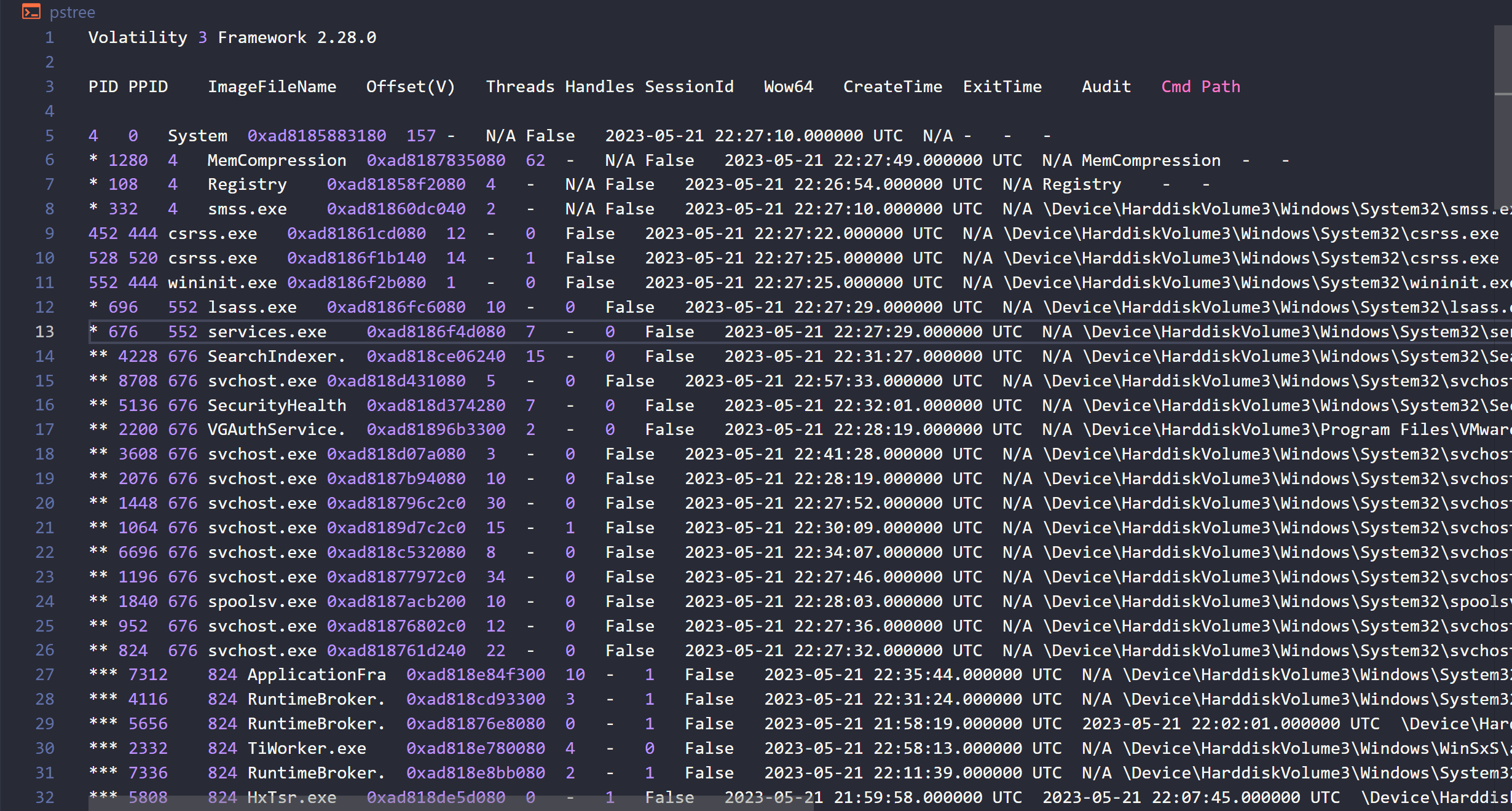

From the output, the PID (process ID) of the malicious process before, which is oneetx.exe, is 5896. Now we can look for which process has the PPID (parent process ID) of 5896 and that is the child process.
As we can see from the PPID column, the process rundll32.exe has the PPID of 5896, which indicates that it is the child process from oneetx.exe. Submitted the asnwer, and correct.
Although rundll32.exe alone is not a malicious executable, it is frequently associated with malware because it is a legitimate, native Windows utility that allows attackers to execute malicious code while disguised as a trusted system process. It is considered a “Living off the Land” (LotL) binary, meaning hackers use tools already present in the operating system to avoid triggering security alerts .
Question 3: What is the memory protection applied to the suspicious process memory region?
Answer: PAGE_EXECUTE_READWRITE
Memory protection is a way to control memory access rights on a computer, and is a part of most modern instruction set architectures and operating systems.
We can determine the protection with windows.malware.malfind plugin. The malfind command helps find hidden or injected code/DLLs in user mode memory, based on characteristics such as VAD tag and page permissions. I use this command and write the output to malfind.json for better analyzing.
vol -f /home/hf/CTF/CyberDefenders/RedLine/MemoryDump.mem windows.malware.malfind > /home/hf/CTF/CyberDefenders/RedLine/malfind.json {
"CommitCharge": 56,
"Disasm": "\"\n0x400000:\tdec\tebp\n0x400001:\tpop\tedx\n0x400002:\tnop\t\n0x400003:\tadd\tbyte ptr [ebx], al\n0x400005:\tadd\tbyte ptr [eax], al\n0x400007:\tadd\tbyte ptr [eax + eax], al\n0x40000a:\tadd\tbyte ptr [eax], al\"",
"End VPN": 4423679,
"File output": "Disabled",
"Hexdump": "4d 5a 90 00 03 00 00 00 04 00 00 00 ff ff 00 00 b8 00 00 00 00 00 00 00 40 00 00 00 00 00 00 00 00 00 00 00 00 00 00 00 00 00 00 00 00 00 00 00 00 00 00 00 00 00 00 00 00 00 00 00 00 01 00 00",
"Notes": "MZ header",
"PID": 5896,
"PrivateMemory": 1,
"Process": "oneetx.exe",
"Protection": "PAGE_EXECUTE_READWRITE",
"Start VPN": 4194304,
"Tag": "VadS",
"__children": []
},Opening the JSON file in VS Code, searching for the malicious process before (oneetx.exe), I found that the protection used is PAGE_EXECUTE_READWRITE. This protection enables execute, read-only, or read/write access to the committed region of pages. Submitted the answer, and correct.
Question 4: What is the name of the process responsible for the VPN connection?
Answer: Outline.exe
During the memory analysis, the process tree output identified a process named tun2socks.exe.
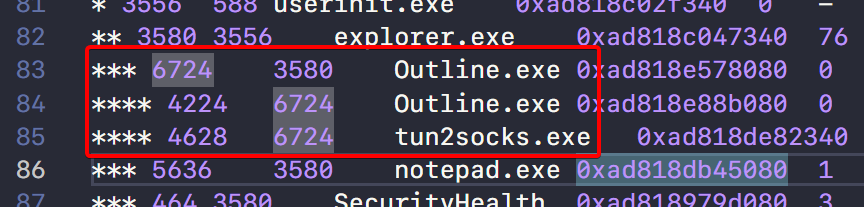
This process is associated with VPN functionalities and is often used as a utility for translating SOCKS proxy traffic into IP packets. However, tun2socks.exe is not an independent process. It operates under the control of its parent process, which orchestrates the VPN connection.
Further inspection of the process tree reveals that the parent process of tun2socks.exe is outline.exe.
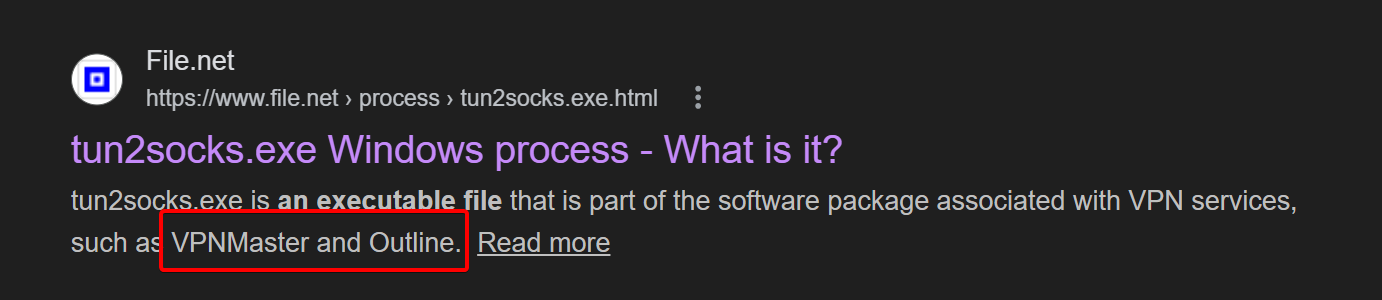
The process responsible for the VPN connection is identified as Outline.exe. This conclusion is derived from its role as the parent process controlling tun2socks.exe and its association with the Outline VPN software.
Question 5: What is the attacker’s IP address?
Answer: 77.91.124.20
In order to find network activities for processes, I used the windows.netscan and wrote the output to netscan.json file.
vol -r json -f /home/hf/CTF/CyberDefenders/RedLine/MemoryDump.mem windows.netscan > /home/hf/CTF/CyberDefenders/RedLine/netscan.jsonSince we have already got the malicious process name, we can just look for the connection that process made.
  {
    "Created": "2023-05-21T23:01:22+00:00",
    "ForeignAddr": "77.91.124.20",
    "ForeignPort": 80,
    "LocalAddr": "10.0.85.2",
    "LocalPort": 55462,
    "Offset": 190771942959648,
    "Owner": "oneetx.exe",
    "PID": 5896,
    "Proto": "TCPv4",
    "State": "CLOSED",
    "__children": []
  }
As we can see, oneetx.exe made a communication to 77.91.124.20 through TCP, port 80 from the victim’s IP address which is 10.0.85.2:55462, and the connection state is CLOSED. Submitted the answer, and correct.
NOTE From the official walkthrough, it turns out that the attacker has two IPs.
Question 6: What is the full URL of the PHP file that the attacker visited?
Answer: http://77.91.124.20/store/games/index.php
At first, I tried to search for a file with .php extension in pstree, pslist, netscan.json and even cmdline. I got nothing. So, I thought about an alternative way, and it was actually more simple and straightforward. I used strings command, and look for the attacker’s IP that I found earlier.
strings MemoryDump.mem | grep "77.91.124.20"From just that command, I found the full path associated with the IP of 77.91.124.20 which is http://77.91.124.20/store/games/index.php and it is a PHP file. Submitted the answer, and correct.
Question 7: What is the full path of the malicious executable?
Answer: C:\Users\Tammam\AppData\Local\Temp\c3912af058\oneetx.exe
Using the output file of windows.pstree plugin I have earlier, I just simply look for, again, the malicious process which is oneetx.exe.

As we can see, the executable was in the Temp directory, specifically within the user’s local application data folder.
The full path is C:\Users\Tammam\AppData\Local\Temp\c3912af058\oneetx.exe. This path is pretty unusual and not the standard path where a legitimate software is usually installed. For example: C:\Program Files or C:\Program Files (x86).