Scenario
A user thought they were downloading the SysInternals tool suite and attempted to open it, but the tools did not launch and became inaccessible. Since then, the user has observed that their system has gradually slowed down and become less responsive.
Question 1: What was the malicious executable file name that the user downloaded?
Answer: SysInternals.exe
One of the main entry points for malware is the the OS’s Downloads folder, since malware is often distributed online as “legitimate” programs, even though they aren’t. On Windows, we can check in the Users/<username>/Downloads folder.
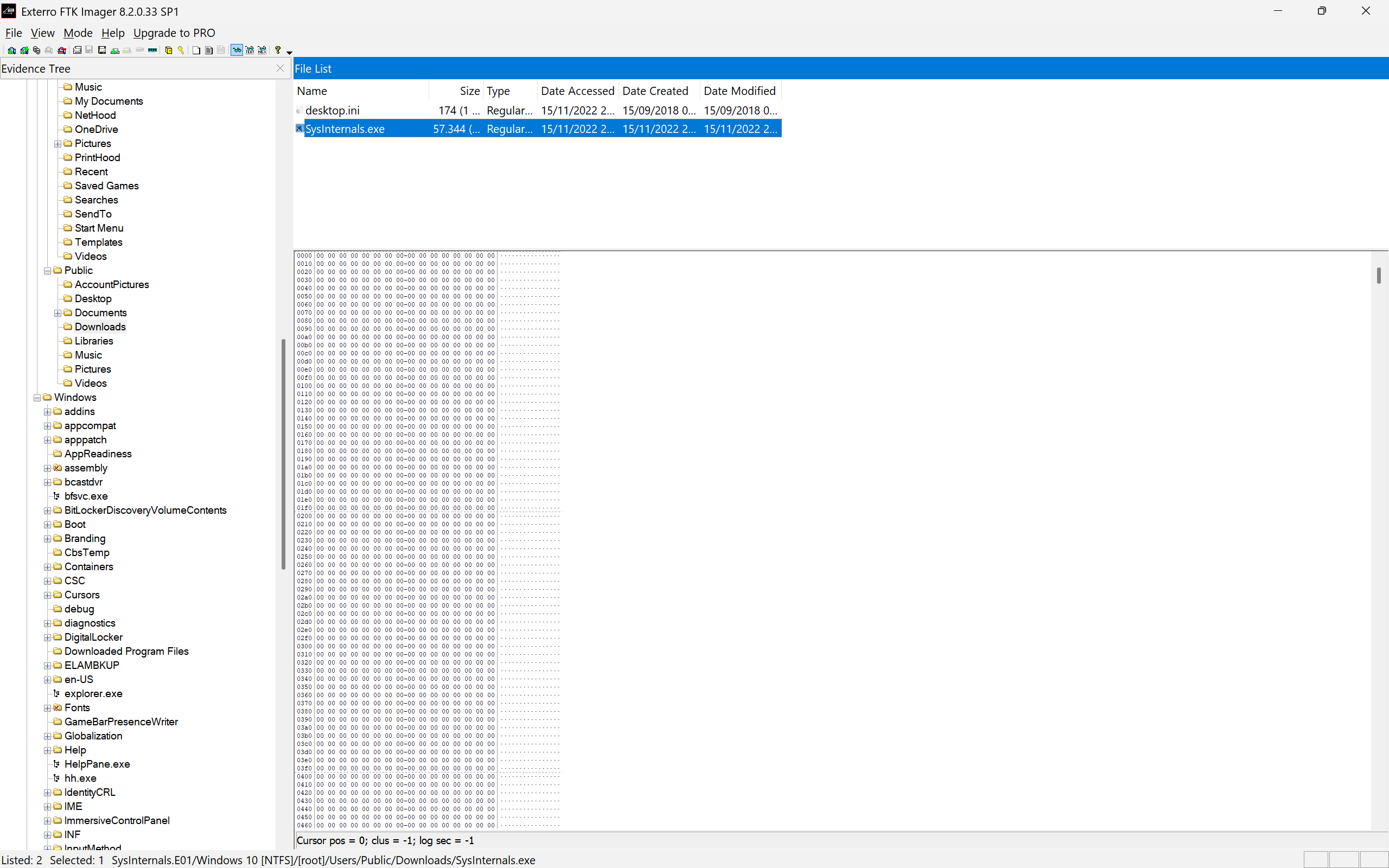
We cannot find anything useful in the IEUSer, so we navigate to Public user. In the Downloadsfolder, we can find a Windows executable named SysInternals.exe. Originally, SysInternals is a collection of over 70 utilities to diagnose, manage, troubleshoot, and secure Windows systems, developed by Mark Russinovich. As far as we can tell, SysInternals does not provide a single executable to run or install, but rather an individual executable for each utilities, or an MSIX Bundle, not an EXE file. So, SysInternals.exe is the answer.
Question 2: When was the last time the malicious executable file was modified?
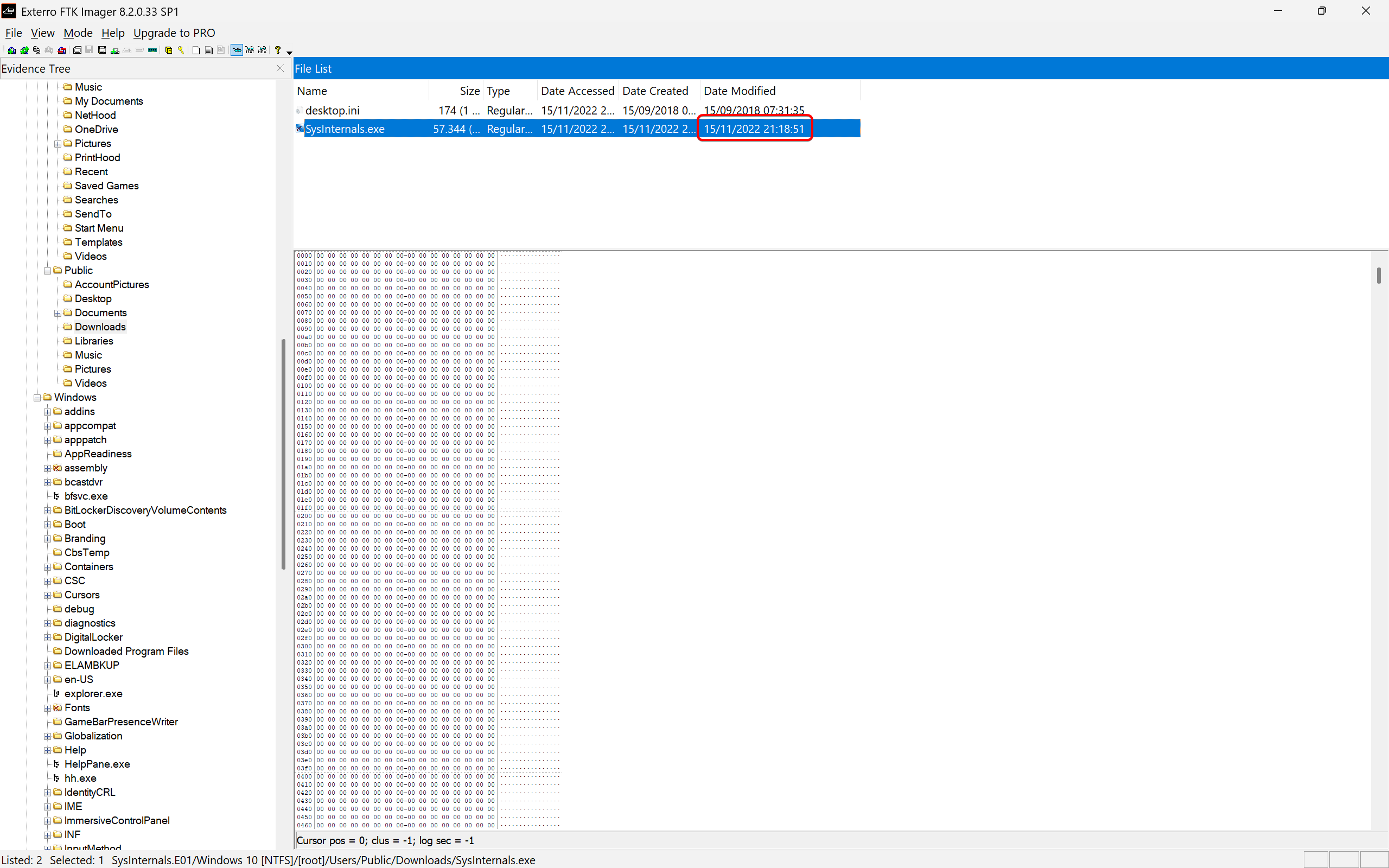
Answer: 2022-11-15 21:18
This one, we can just look for the Date Modified column in FTK Imager, and we can tell that this file was last modified on 2022-11-15 21:18.
Question 3: What is the SHA1 of the malware?
Answer: fa1002b02fc5551e075ec44bb4ff9cc13d563dcf
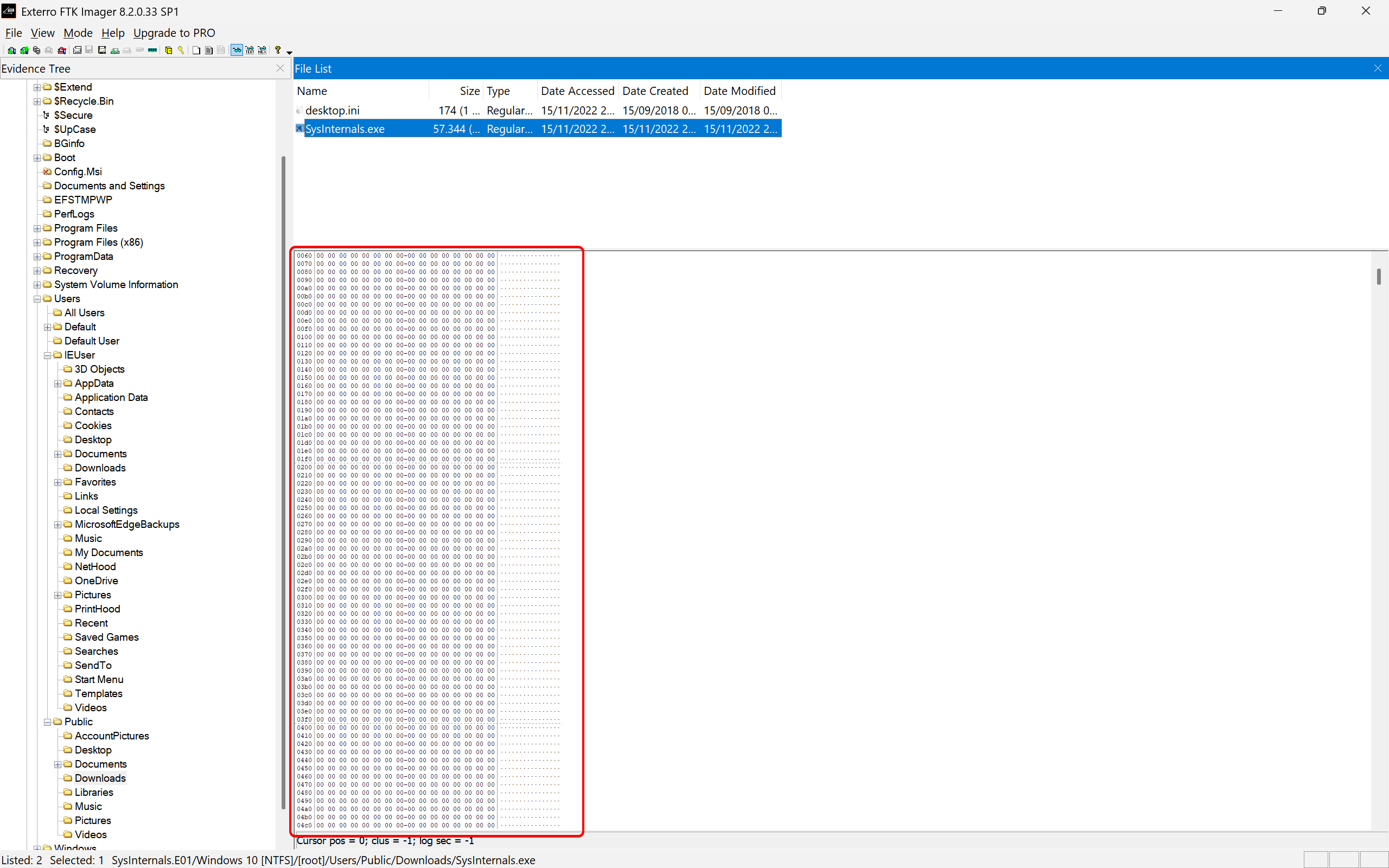
At first, we thought this is going to be a simple question. Just export the list of hashes to a CSV, and then look for the SHA1 of the malicious executable. But it turns out that the HEX dump of the file is filled entirely with zeros, indicates that the file may have been tampered with or deleted prior to the disk capture, rendering direct hashing ineffective.
For this, we are going to need AmCache, a crucial Windows registry artifact that tracks metadata about executed programs, installed applications, and loaded drivers. We can look for the key artifact, Amcache.hve, which is a Windows registry hive, in C:\Windows\appcompat\Programs, and export it to out destined path to analyze it further.
Here, we can use a tool called AmCacheParser. Using the command below:
amcacheparser -f Amcache.hve --csv amcacheThis command specifies the Amcache.hve file with the -f flag, and the --csv option outputs the results in CSV format. The --csv amcache directive names the output folder amcache. These CSV files contains detailed information about all executables recorded by the AmCache, including their hash values.
Now we can simply cat all the CSV files, and filter it with grep for something like SysInternals.exe, using the command below:
cat * | grep sysinternals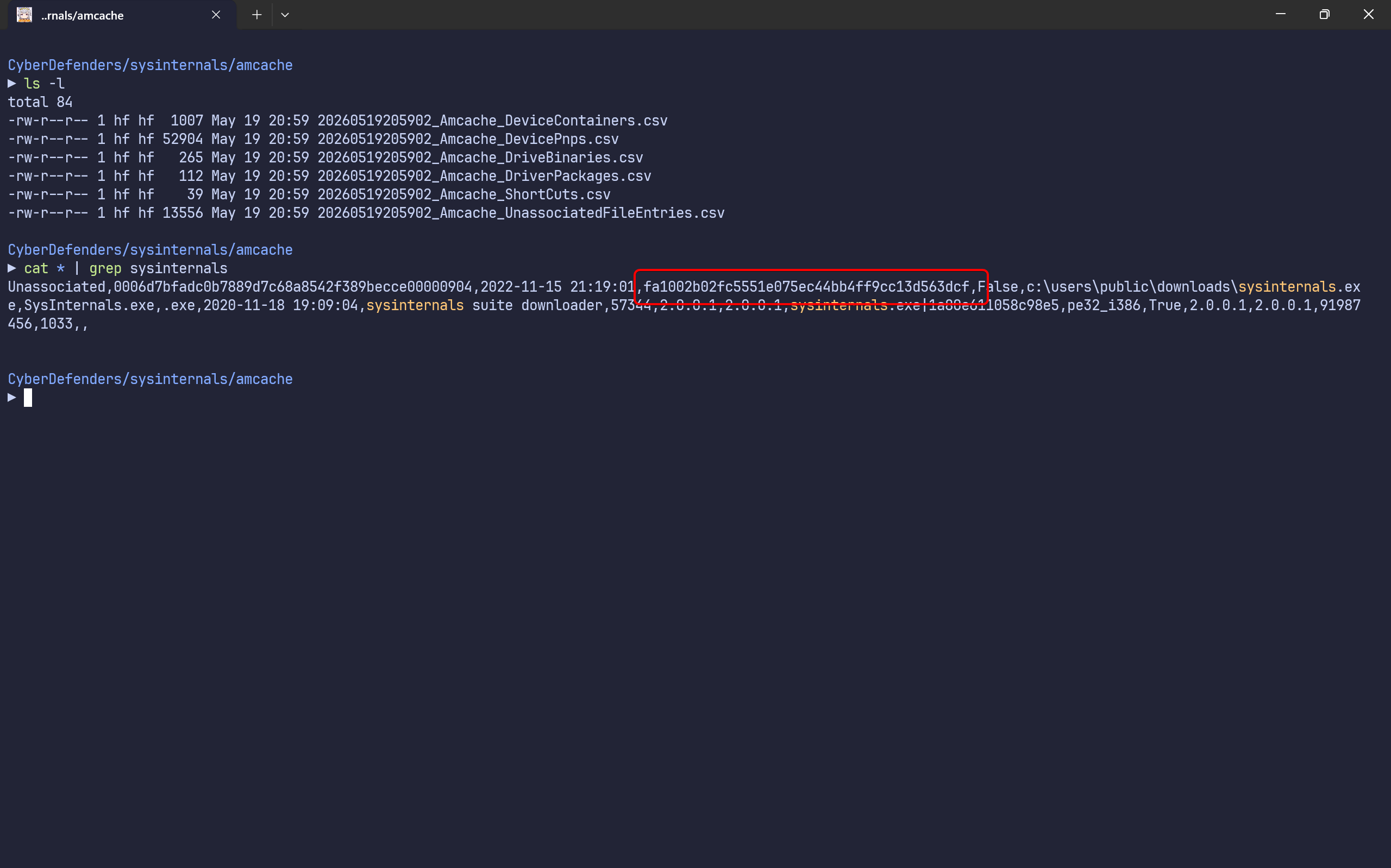
There, we found that the SHA1 of SysInternals.exe is fa1002b02fc5551e075ec44bb4ff9cc13d563dcf.
Question 4: Based on the Alibaba vendor, what is the malware’s family?
Answer: Rozena
For this one, we are going to need an online threat intelligence platform. One of the most popular is VirusTotal. We can simply take the SHA1 we have before as input, and it will give us the detailed information about the malware, if anyone has already reported it.
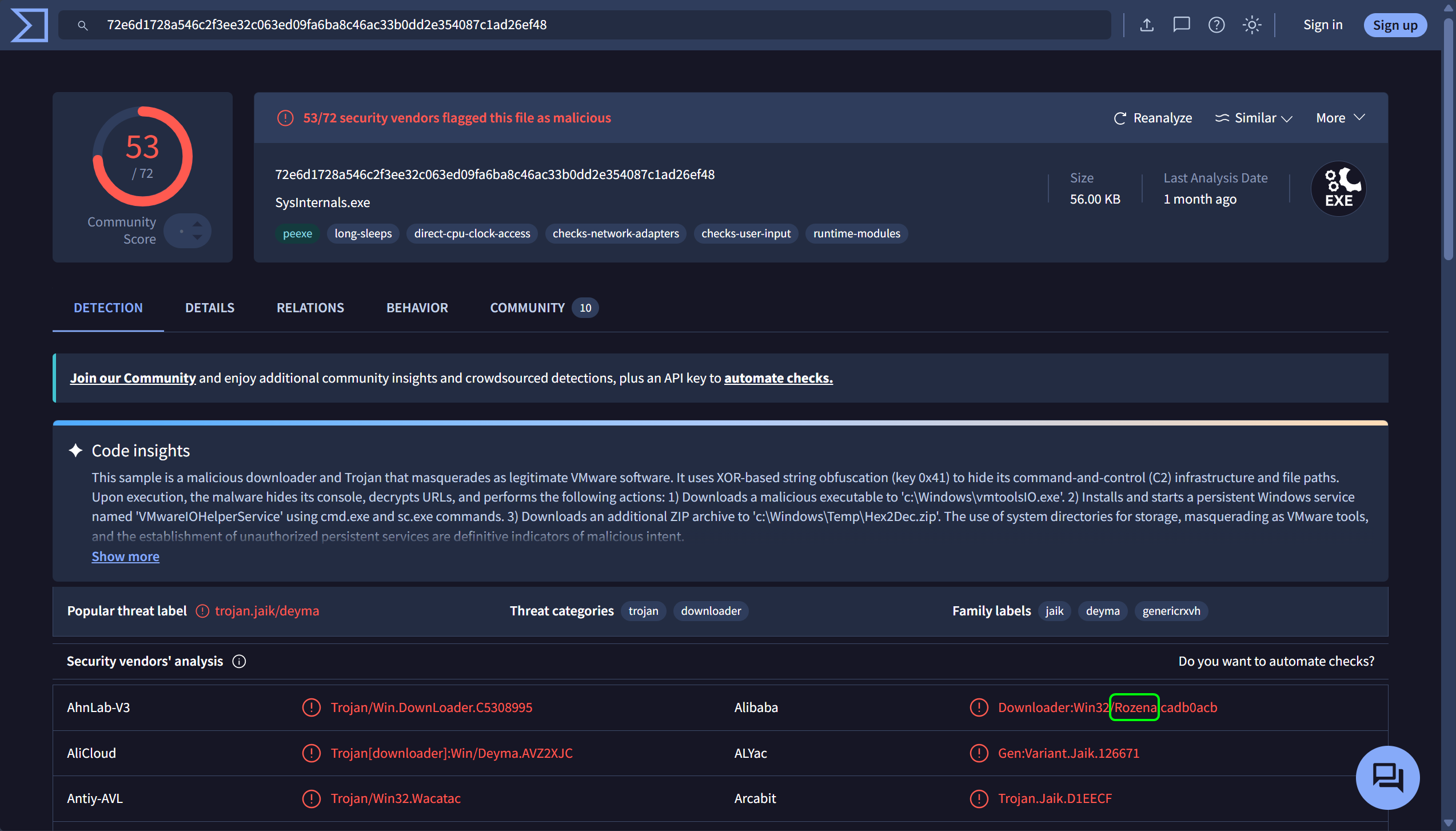
As we can see, “53 of 73 security vendors flagged this file as malicious”. So this has a very low chance that this is a false positive. Now, regarding the question, Alibaba, one of the security vendors, identified this malware as Rozena.
Question 5: What is the first mapped domain’s Fully Qualified Domain Name (FQDN)?
Answer: www.malware430.com
A fully qualified domain name (FQDN), sometimes also called an absolute domain name, is a domain name that specifies its exact location in the tree hierarchy of the Domain Name System (DNS). For instance, in the FQDN somehost.example.com, com is a label directly under the root zone, example is nested under com, and finally somehost is nested under example.com.
We can also identify this via VirusTotal’s Relations tab, and look into the “Contacted URLs” section.
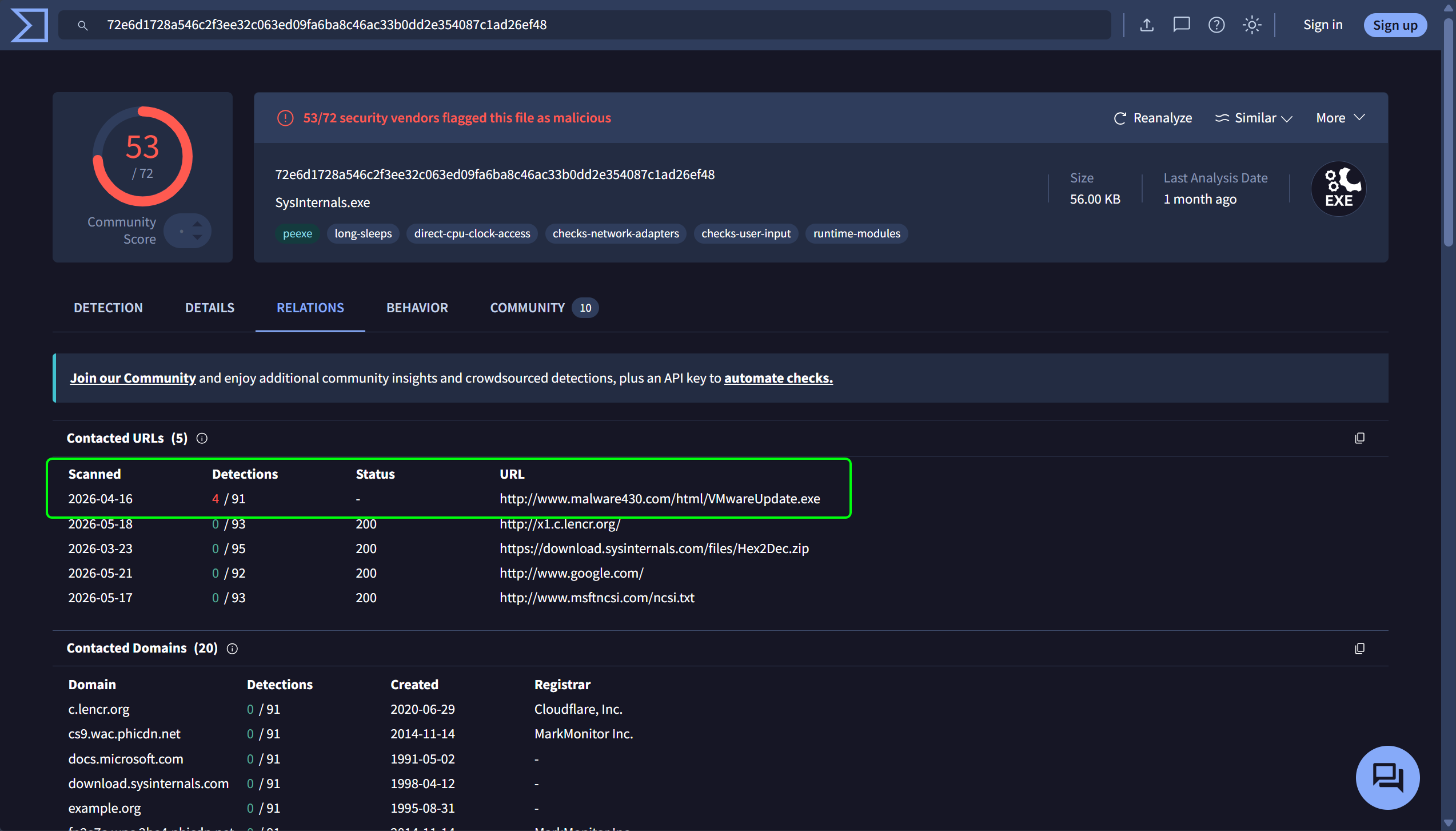
We can see that the first URL was contacted in April 16th, 2026 and points to this exact URL:
http://www.malware430.com/html/VMwareUpdate.exeIf we filter the URL and just take the FQDN, then it will be www.malware430.com.
Question 6: The mapped domain is linked to an IP address. What is that IP address?
Answer: 192.168.15.10
To answer the question, we can try to look for the IP in the Relations tab in VirusTotal, but we did not found anything useful.
Other ways to determine a malicious IP address is through a command line. We can use Autopsy or FTK Imager for this question. Here, we are using Autopsy to do the analysis, simply because we can resume our analysis anytime because the project is stored on the disk.
In this path:
C:\Users\IEUser\AppData\Roaming\Microsoft\Windows\PowerShell\PSReadLineWe can found the ConsoleHost_history.txt file, storing the command history that PowerShell has ran.
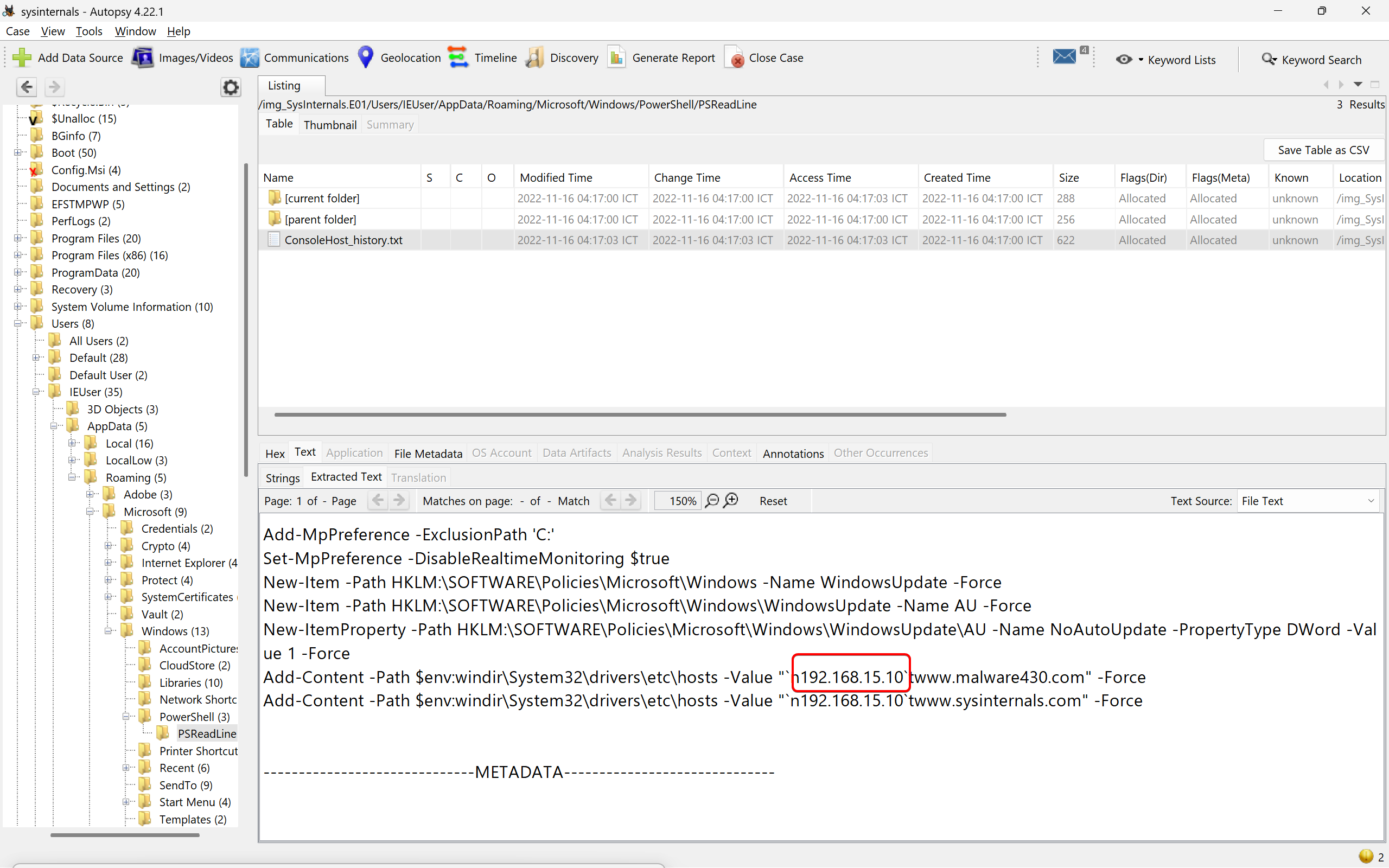
There, we found the malicous IP. These commands append entries to the hosts file, redirecting requests for www.malware430.com and www.sysinternals.com to the IP address 192.168.15.10.
Question 7: What is the name of the executable dropped by the first-stage executable?
Answer: vmtoolsIO.exe
To identify the executable dropped by the first-stage malware, we need to examine the process execution behavior detailed in the VirusTotal report. The Behavior tab provides insights into the actions performed by the malicious SysInternals.exe file after its execution, including processes created, services initiated, and system modifications. The report reveals that upon execution, SysInternals.exe spawned several processes. The first notable process is "C:\Users\<USER>\AppData\Local\Temp\Sysinternals.exe". This indicates that the malware copied itself to the temporary directory under the same name, a common tactic to evade initial detection and establish persistence. Following this, the malware invoked the Windows Command Prompt cmd.exe to execute a series of commands:
"C:\Windows\System32\cmd.exe" /C c:\Windows\vmtoolsIO.exe -install && net start VMwareIOHelperService && sc config VMwareIOHelperService start= auto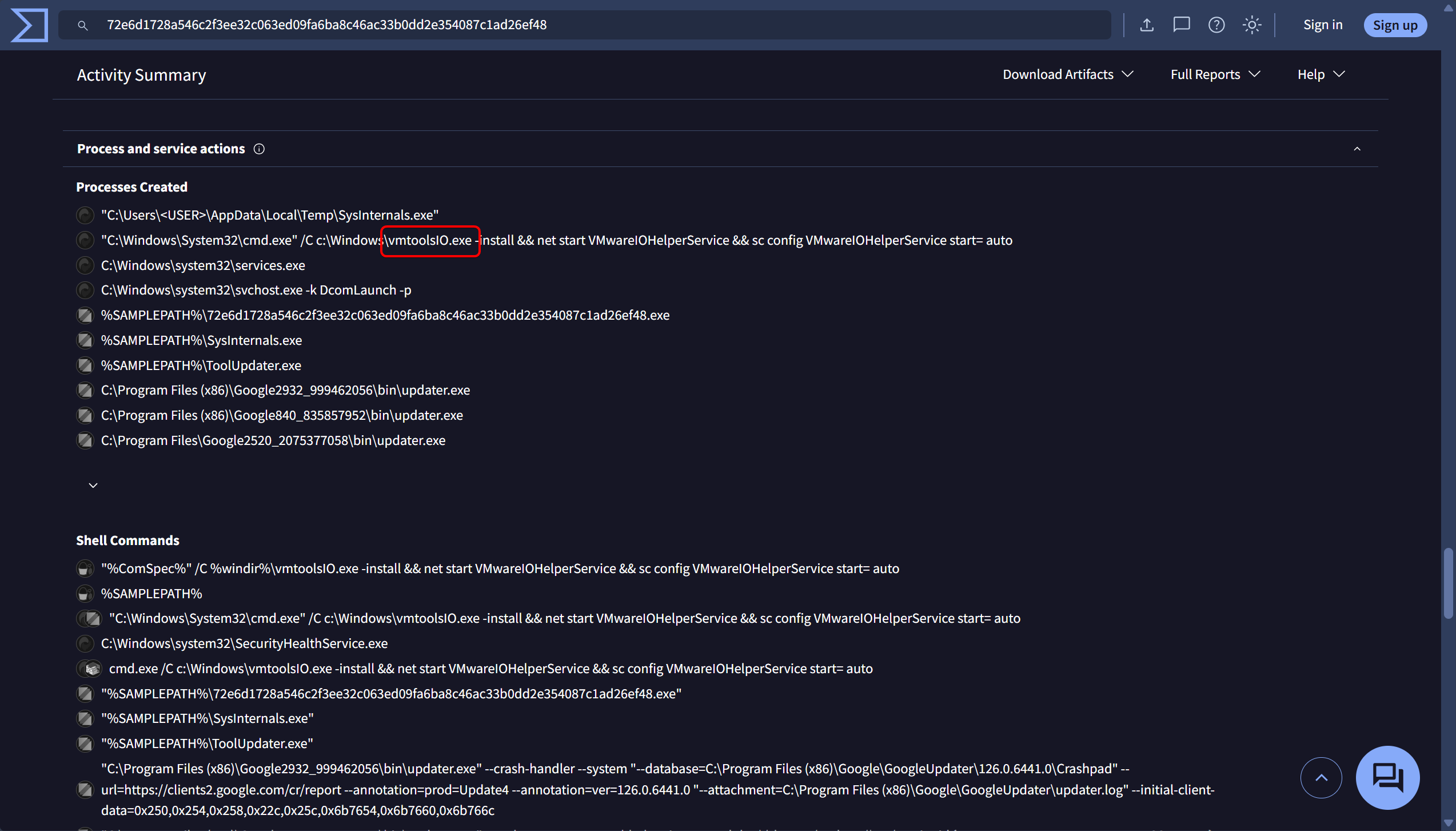
This command installs a secondary executable named vmtoolsIO.exe and configures a new service called VMwareIOHelperService to start automatically. The use of net start and sc config commands are indicative of the malware attempting to establish persistence through Windows services, ensuring that the malicious payload runs on system boot or during specific triggers. Subsequently, services.exe and svchost.exe processes are launched, which are legitimate Windows processes commonly abused by malware to run under the guise of trusted system services. This pattern suggests that vmtoolsIO.exe did successfully install and integrate a malicious service into the system’s service management framework.
Question 8: What is the name of the service installed by the second-stage executable?
Answer: VMwareIOHelperService
We already know what was the 2nd-stage executable dropped before. 2nd-stage malware can also be used by cybercriminals to perform another command to avoid detection from one single source. In VirusTotal, we can go to the Behaviour tab, and look for commands executed for or by vmtoolsIO.exe.
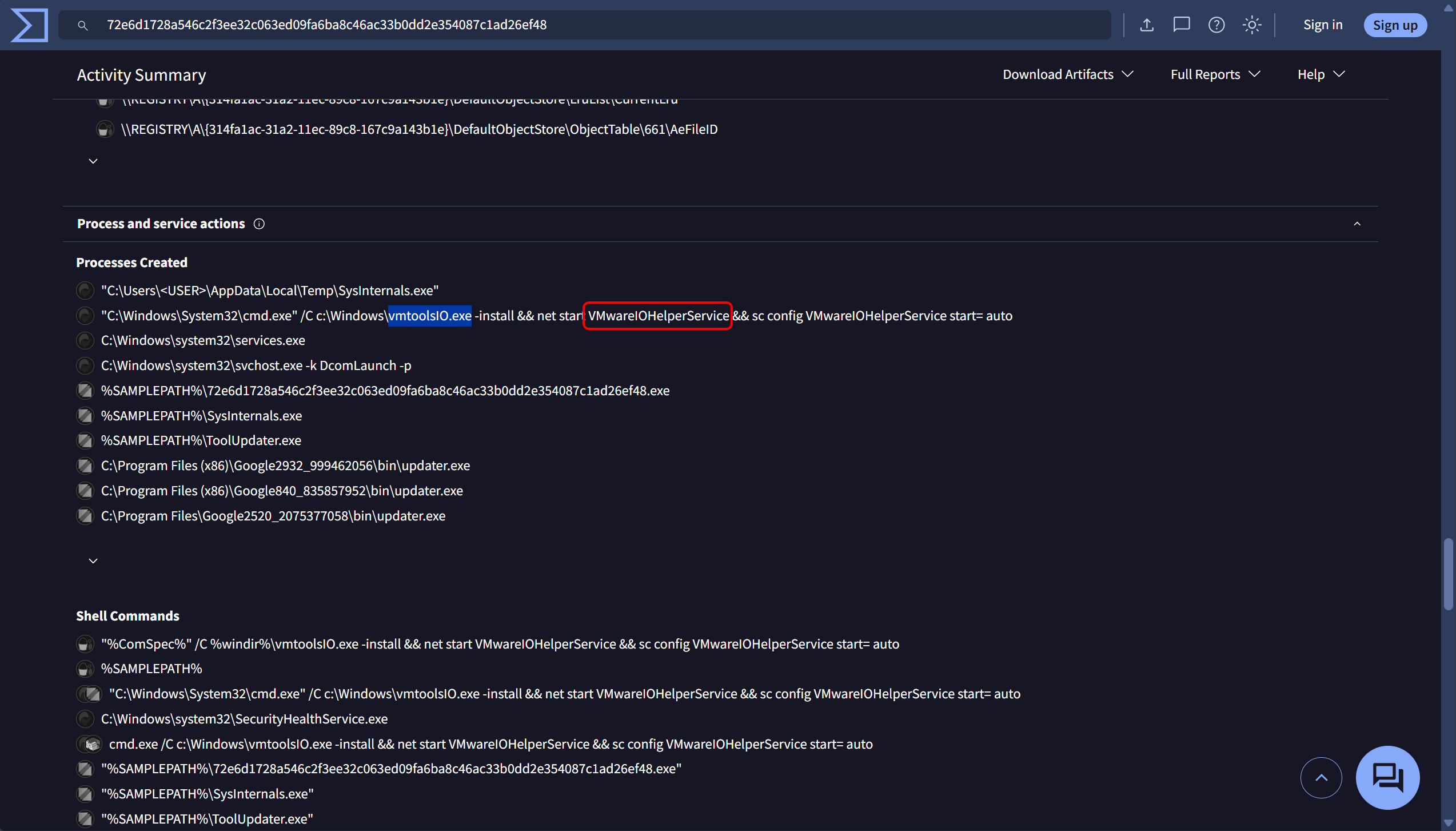
In the Process and service actions, we can see that vmtoolsIO.exe was being executed using Windows Command Prompt, and start the VMwareIOHelperService. This code sets up a new service called VMwareIOHelperService to launch automatically and installs a secondary executable called vmtoolsIO.exe.
The malware’s attempt to establish persistence through Windows services is demonstrated by the use of net start and sc config instructions, which guarantee that the malicious payload runs upon system boot or during particular triggers. The legitimate Windows processes services.exe and svchost.exe, which are frequently exploited by malware to operate under the pretense of trusted system services, are then started. This pattern indicates that a malicious service was successfully installed and integrated into the system’s service management framework by vmtoolsIO.exe.